
 EN
EN BG
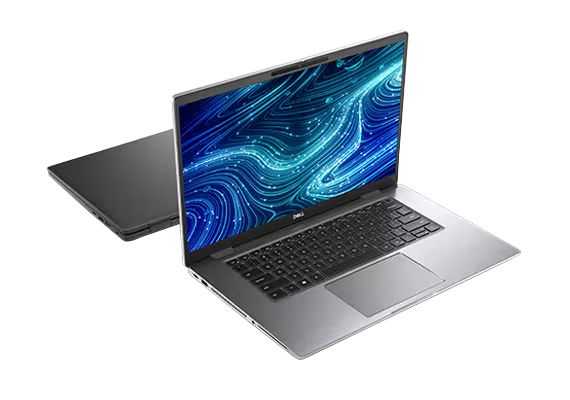
BGDell Latitude 7520 15.6″ business laptop from the premium Latitude 7000 series
The Dell Latitude 7520 is the 15.6-inch member of Dell's premium Latitude 7000 series — a full premium business laptop for people who put screen area ahead of compactness. As a refurbished business laptop from ITR Bulgaria, it is a sensible choice for mostly desk-based work, where the large screen does more for you than low weight.
Benefits
Why the Dell Latitude 7520 makes sense as a large-screen refurbished business laptop from the premium Latitude series
15.6″ premium format — a rare class
The Dell Latitude 7520 is the first 15.6-inch model in the premium Latitude 7000 series. In the larger size, premium business options are fewer than in the 14-inch class.
Large screen for spreadsheet work
The 15.6-inch screen gives you more physical area for spreadsheets; how many rows you see depends on resolution and scaling. The keyboard has no dedicated number pad — worth knowing if you do a lot of numeric entry.
Optional 1080p IR camera
An optional Full HD camera with IR for Windows Hello and a physical privacy shutter — uncommon in the 15-inch class of its generation, where most rivals stayed on 720p.
Optional 63 Wh with ExpressCharge
An optional 4-cell 63 Wh battery with Dell ExpressCharge — up to 80% in about an hour and a full charge in about two hours with the laptop off, a compatible battery and a suitable Dell USB-C adapter.
Dell Optimizer AI software
When the relevant features are enabled, the software package learns user habits and tunes battery, call audio and network priorities — a functional difference HP and Lenovo do not offer in the same form.
2× Thunderbolt 4 + HDMI 2.0
Two Thunderbolt 4 ports for single-cable docking and multi-monitor setups, plus HDMI 2.0. For a wired office network you need a compatible external Ethernet adapter or a dock with RJ45.
Carbon fiber or aluminium
A carbon fiber or aluminium chassis that passes MIL-STD-810H testing. Carbon fiber configurations start at 1.53 kg with an FHD display, M.2 SSD and 42 Wh battery — light for a 15-inch machine.
Intel Iris Xe graphics (Gen 11)
The 11th-gen Intel Core platform (Tiger Lake) brings integrated Iris Xe graphics — enough for a modern office suite, video conferencing and a multi-monitor setup.
TPM 2.0 + optional ControlVault 3
Enterprise security: TPM 2.0 as standard, an optional Dell ControlVault 3 for credentials and biometrics, with an optional fingerprint reader and IR camera for Windows Hello.
Value as a refurbished laptop
As a used business laptop from the premium Latitude series, the Dell Latitude 7520 gives you a large premium screen at a more sensible price than a new 15-inch machine in the same class.
Dell Latitude 7520: the 15.6″ Latitude 7000 premium model for a larger workspace
In premium business laptops, 15.6-inch options are fewer than 14-inch ones — most corporate fleets settle on 14″ as their mobility standard, and the larger screen was long left to mainstream machines and workstations. The Dell Latitude 7520 filled exactly that gap: it is the first 15.6-inch model in the premium Latitude 7000 line. Until it arrived, Dell had no big-screen option in the premium Latitude 7000 series — only the mainstream 15-inch Latitude 5000 below it and the heavy Precision workstations above. The 7520 closed that gap with a full Latitude 7000, just with more screen, for people who put working area ahead of compactness.
Choosing 15.6 inches here is a purpose, not a fallback. For a finance manager who keeps a spreadsheet with dozens of rows open all day, the 15.6-inch screen gives more physical area than a 14-inch one and, at a suitable resolution and scaling, more visible rows — small on paper, noticeable by the end of the day. The same logic holds for an engineer reviewing drawings, or a manager whose laptop sits on the desk all day and rarely travels. To that larger screen the Dell Latitude 7520 adds something uncommon for the 15-inch class of its generation: an optional 1080p IR camera with a physical shutter. Once video calls became a daily routine, that camera was the difference between a clean professional presence and a soft, blurred image in front of a client — most rivals from the same period still shipped 720p.
Underneath, the Dell Latitude 7520 runs on Intel's 11th-gen Core platform (Tiger Lake) with integrated Iris Xe graphics — enough for a modern office suite, video conferencing and a multi-monitor setup across its two Thunderbolt 4 ports. There is no RJ45 on board. Needing an external Ethernet adapter or a compatible dock seems a minor detail until you land in an office still running a wired network. The optional 63 Wh battery with ExpressCharge reaches up to 80% in about an hour with the laptop off and a suitable Dell adapter. The chassis comes in carbon fiber or aluminium and passes MIL-STD-810H testing; carbon fiber configurations start at 1.53 kg with an FHD display, M.2 SSD and 42 Wh battery — light for a 15-inch machine — while Dell lists 1.76 kg for the aluminium version. For comparison, the HP EliteBook 850 G8 starts at 1.69 kg without a touchscreen or 1.77 kg with one, and the Lenovo ThinkPad T15 Gen 2 starts at 1.75 kg with a PPS lid and UHD display. On top sits Dell Optimizer, the software that, with its features enabled, learns your habits and tunes battery, call audio and network priorities.
The ExpressCharge battery, which reaches up to 80% in about an hour with the laptop off and a suitable adapter, carries a scientific pedigree few components can claim. In 2019 the Nobel Prize in Chemistry went to the creators of the lithium-ion cell — John Goodenough, Stanley Whittingham and Akira Yoshino; Goodenough received it at 97, the oldest laureate in the prize's history. Sony had launched it commercially back in 1991, initially for camcorders. Three decades on, the same chemistry, polished to maturity, carries the Dell Latitude 7520 through a working day — Nobel science in the most literal office sense.
An honest word on the trade-offs: the Dell Latitude 7520 is not a travel machine. Even in carbon it is larger and wider than its 14-inch siblings, and the memory is LPDDR4x soldered to the board — up to 32 GB, chosen once at purchase, with no slot for a later upgrade (so on a refurbished unit it pays to pick enough RAM from the start). If mobility matters most, the 14-inch Dell Latitude 7420 offers the same Latitude 7000 features in a lighter body. If you need expandable memory, the HP EliteBook 850 G8 and Lenovo ThinkPad T15 Gen 2 give you SO-DIMM slots (and the T15 adds a TrackPoint and ThinkShield), at the cost of a weaker standard camera. As a refurbished business laptop from ITR Bulgaria, the 7520 has a clear logic: the Latitude 7000 was built for a long corporate life, its parts are standardised and the SSD swaps out easily. That turns a used business laptop from the premium class into a refurbished laptop with a real warranty — a large premium screen at a sensible price, instead of a new budget 15-inch machine from a lower tier.
Who it suits
Scenarios where the Dell Latitude 7520 makes the strongest case
Finance and operations managers
People who spend the day in wide spreadsheets and reports. The 15.6-inch screen gives more physical area for spreadsheets, while the number of visible rows depends on resolution and scaling. There is no dedicated number pad, which matters for frequent numeric entry.
Engineers and architects, for review
For reviewing drawings, marking up and presenting, the larger area is a genuine help. With integrated Iris Xe the machine handles review and light tasks; for heavy 3D rendering or CAD modelling, the Dell Precision line with discrete graphics is the better fit.
Desktop replacement
For mostly stationary work at a fixed desk — a large screen, a single cable to a dock over Thunderbolt 4, and the option to pack the laptop away when needed.
Equipping office staff
Companies equipping staff with a large premium screen from an established brand. As a refurbished business laptop from the Latitude 7000 line, the Dell Latitude 7520 supports Dell Command Update for driver, BIOS and firmware updates and Dell SafeBIOS with BIOS integrity verification.
Model highlights
The first 15.6″ Latitude 7000
The 7520 is the first 15.6-inch model in the premium Latitude 7000 series — above Latitude 5000 (mainstream) and far above Latitude 3000 (entry), below the ultra-premium Latitude 9000. A premium big-screen class that the Latitude 7000 did not offer before.
Display options up to 4K UHD
A 15.6-inch 16:9 IPS panel — FHD (1920×1080) or a 4K UHD (3840×2160) option at 400 nits. Brighter panels come with ComfortView Plus for hardware-level blue-light reduction.
Optional 63 Wh ExpressCharge battery
An optional 4-cell 63 Wh battery with Dell ExpressCharge — up to 80% in about an hour and a full charge in about two hours with the laptop off, a compatible battery and a suitable Dell USB-C adapter. Easy through a long workday without hunting for an outlet.
2× Thunderbolt 4, USB-A, HDMI 2.0
Two Thunderbolt 4 ports for single-cable docking and multi-monitor work, plus two USB-A 3.2, HDMI 2.0 and a microSD reader. Compatible with Dell docks for a one-cable workstation.
Optional 1080p IR camera
A Full HD 1080p camera with IR for Windows Hello and a physical privacy shutter (optional). A cleaner image on video calls than the standard 720p cameras of its rivals' generation.
Carbon or aluminium, MIL-STD-810H
A carbon fiber or aluminium chassis 17.5 mm thick at the front and 18.4 mm at the rear in aluminium or 18.89 mm in carbon fiber, which passes MIL-STD-810H testing. Carbon fiber configurations start at 1.53 kg with an FHD display, M.2 SSD and 42 Wh battery — light for a 15-inch machine with this kind of durability.
Dell Optimizer + optional ComfortView Plus
With the relevant features enabled, Dell Optimizer learns user habits and tunes battery, call audio and network priorities. On the 400-nit FHD or UHD panels, ComfortView Plus reduces blue light at the hardware level — useful for long stretches of document work.
A logical refurbished choice
The Latitude 7000 is built for a long corporate life cycle — standardised parts, good serviceability, an easy SSD swap. That leaves the Dell Latitude 7520 well positioned as a used business laptop that has been through refurbishment.
Refurbished by ITR Bulgaria: what value do you get?
Buying a refurbished business-class laptop makes the most sense when the device has gone through a standardised in-house refurbishment process and ships with a real warranty. That is how used laptops become refurbished laptops — a practical, dependable and professional alternative to new budget machines, and a far more sensible buy than new premium equivalents.
- ✓ Technical audit and cosmetic assessment to an internal standard
- ✓ Refurbishment, cleaning, quality improvement and configuration to a standard for repeat business use
- ✓ Original software and a configuration prepared for the specific model
- ✓ Packaging, a real warranty and model support from ITR Bulgaria
Ready to see what's in stock?
The Dell Latitude 7520 is a refurbished business laptop with a 15.6-inch screen from the premium Latitude 7000 series — tested and prepared for corporate use. Browse the current stock or get in touch for help.
Additional information
Where does the Dell Latitude 7520 fit in the series? ▼
The Dell Latitude 7520 belongs to the Latitude 7000 — Dell's premium business line. In the portfolio hierarchy, the 7000 sits above the Latitude 5000 (mainstream) and well above the Latitude 3000 (entry), with the ultra-premium Latitude 9000 above it. That positioning makes the series a direct rival to the HP EliteBook 800 and the Lenovo ThinkPad T / X1.
What is specific about the Dell Latitude 7520 is its size. This is the 15.6-inch member of the series — the bigger sibling of the 14-inch Dell Latitude 7420 and the 13.3-inch Dell Latitude 7320. Within the 7000 line, the Dell Latitude 7520 is the choice for more screen area when the machine mostly stays on a desk.
More to the point, the Dell Latitude 7520 was the first 15.6-inch Latitude 7000 at all. Before it, the premium big-screen format was missing from the Latitude 7000 series, between the mainstream Latitude 5000 and the Precision workstations — the Dell Latitude 7520 closed exactly that gap in the line.
The Dell Latitude 7520 is not ideal if… ▼
- You carry the laptop daily and care about minimal weight — even in carbon, the 15.6-inch Dell Latitude 7520 is larger than the 14-inch models. For mobility, the Dell Latitude 7420 (14″) is the better fit.
- You want a more compact 13-inch class for frequent travel — the Dell Latitude 7320 is the smaller alternative from the same 7000 series.
- You need to upgrade RAM after purchase — the memory is LPDDR4x soldered to the board (up to 32 GB, no SO-DIMM slot). The HP EliteBook 850 G8 and Lenovo ThinkPad T15 Gen 2 offer SO-DIMM upgrades.
- You work with heavy 3D, rendering or CAD modelling — the Dell Latitude 7520 relies on integrated Iris Xe graphics with no discrete GPU. For those tasks, look at the Dell Precision line.
- You need 360-degree hinges and tablet mode — the Dell Latitude 7520 is a standard clamshell (touch is available only as a screen option, not as a convertible build).
- You need a guaranteed specific configuration (a particular CPU, RAM, SSD, display or camera) — configurations vary, so it is important to check the specific unit before buying.
Choosing the right size and form factor ▼
The 15-inch class (Dell Latitude 7520) gives the most screen area among Latitude 7000 models of this generation, but the keyboard has no dedicated number pad. Suited to mostly desk-based work, spreadsheets and multi-window setups. Trade-off: a larger, heavier chassis.
The 14-inch class (Dell Latitude 7420): the most balanced for mobile users — a shared Latitude 7000 platform and core features at a starting weight of 1.22 kg for carbon fiber configurations with a 42 Wh battery, M.2 SSD and Full HD display.
The 13-inch class (Dell Latitude 7320): maximum compactness for frequent travel. Trade-off: the least screen area and no number pad.
Form factor: the Dell Latitude 7520 is a standard clamshell with no 360-degree hinges. A touch panel is a screen option, but it does not make the model a convertible. If you need tablet mode, look at the Dell Latitude 7420 2-in-1 (a separate build).
Alternative models ▼
Within Dell:
Dell Latitude 7420 — the 14-inch sibling from the same 7000 series. A shared platform and core premium features in a lighter body (starting at 1.22 kg in carbon fiber configurations with a 42 Wh battery, M.2 SSD and Full HD display). A logical alternative if mobility matters more than screen area.
Dell Latitude 5520 — the mainstream 15-inch class, more affordable than the Dell Latitude 7520. It offers SO-DIMM memory but a simpler build and fewer premium features. A lower tier in the Dell Latitude line.
Dell Precision (15″) — if you need discrete graphics and workstation power for CAD or rendering. A higher class and price, for a different purpose.
Cross-brand alternatives (15″, premium business class, Gen 11):
HP EliteBook 850 G8 — a direct rival in the 15-inch premium class (starting at 1.69 kg without a touchscreen or 1.77 kg with one). It offers two SO-DIMM slots for memory expansion and an optional HP Sure View Reflect panel that limits side viewing. Dell answers with an optional 1080p camera and Dell Optimizer.
Lenovo ThinkPad T15 Gen 2 (Intel) — a 15-inch Lenovo ThinkPad (from 1.75 kg with a PPS lid and UHD display) with one SO-DIMM slot for memory expansion, ThinkShield security and the classic TrackPoint. Dell has the better camera option and a carbon/aluminium chassis.
Note: do not compare the Dell Latitude 7520 with the Dell Latitude 3520 or HP ProBook 450 G8 — those are a different, lower business class with a different target group.
Refurbished by ITR Bulgaria: what value do you get? ▼
The Dell Latitude 7520 is a model where refurbishment by ITR Bulgaria has clear logic. The Latitude 7000 series was designed with a long corporate life cycle in mind — parts are standardised, documentation is available, and the SSD swaps out easily through the single M.2 slot. That allows professional refurbishment with a clear result.
After refurbishment, the used laptop is prepared for repeat business use: cleaning, configuration, original software and packaging with a real warranty. Because the RAM is soldered and chosen once, ITR Bulgaria prepares the configuration with enough memory from the start — for companies equipping their staff, that is the difference between an unchecked used laptop and a refurbished business laptop with real support.
Frequently asked questions ▼
Is the Dell Latitude 7520 a good choice as a used laptop?
Yes, if you need a large screen. The Dell Latitude 7520 is the 15.6-inch premium model of the Latitude 7000 — a premium business class built for a long corporate life, which makes it well suited to refurbishment. As a refurbished laptop, it gives you a large premium screen at a more sensible price than a new 15-inch machine in the same class.
What is the difference between the Dell Latitude 7520 and the Dell Latitude 7420?
The difference is mainly size, not class. Both are from the premium Latitude 7000 series with equivalent features — Dell Optimizer, ExpressCharge, an optional 1080p camera. The Dell Latitude 7420 is 14-inch and lighter (starting at 1.22 kg in carbon fiber configurations with a 42 Wh battery, M.2 SSD and Full HD display), easy to carry. The Dell Latitude 7520 is 15.6-inch with a larger screen but no dedicated number pad, and is aimed at mostly desk-based work.
Can the memory on the Dell Latitude 7520 be upgraded?
No. The memory is LPDDR4x soldered to the board, up to 32 GB — chosen once at configuration, with no SO-DIMM slot for a later upgrade. The SSD, however, can be replaced through the M.2 slot. So on a refurbished unit it is important to pick enough RAM from the start.
Is the Dell Latitude 7520 suitable for CAD and graphics work?
For reviewing drawings, marking up and presenting — yes, the large screen area helps. But the Dell Latitude 7520 relies on integrated Intel Iris Xe graphics with no discrete GPU, so for heavy 3D rendering or complex CAD modelling the Dell Precision line with a discrete card is the more logical choice.