
 EN
EN BG
BG
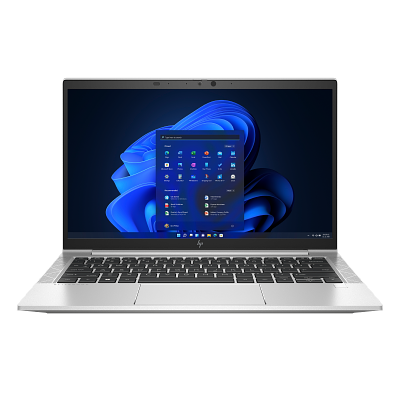
HP EliteBook 830 G8 The compact 13.3-inch EliteBook for people whose laptop travels more than it sits on a desk
The HP EliteBook 830 G8 is the 13.3-inch member of the premium EliteBook 800 line — sharing the platform and core security and business features of the 14-inch HP EliteBook 840 G8, in a smaller, lighter chassis. The G8 generation brings Intel 11th Gen, Thunderbolt 4 and something rare for the compact class: two memory slots you can upgrade. As a refurbished business laptop from ITR Bulgaria, it is a compact EliteBook with a real warranty and room to grow.
Benefits
Why the HP EliteBook 830 G8 is a sensible pick for travelling professionals as a refurbished laptop
SO-DIMM upgrade to 64 GB — rare in the 13.3″ class
Two accessible SO-DIMM slots for memory up to 64 GB DDR4-3200. Most compact rivals use soldered RAM — here you can add memory two years later. A genuine long-term buffer for teams that buy once and keep the machine for years.
13.3″ with a starting weight of 1.26 kg
A compact chassis with a starting weight of 1.26 kg (non-touch) and an 85% screen-to-body ratio thanks to thin bezels. It disappears into a smaller bag without cutting the business features of the series.
Aluminium unibody + MIL-STD-810H
A machined aluminium chassis at a 17.9 mm profile, tested to MIL-STD-810H for durability. Built for a long corporate life, not one budget season.
HP Wolf Security platform
The same corporate security as the HP EliteBook 840 G8: Sure Start (hardware BIOS protection), Sure Run, Sure Recover and Sure Sense, depending on configuration and software provisioning. Features that rarely drop below premium business class.
53 Wh battery with HP Fast Charge
A 53 Wh battery rated up to 14 hours 15 minutes on HP's published MobileMark 2018 test with Windows 10, plus HP Fast Charge — up to 50% in 30 minutes with the laptop off or in standby and a compatible adapter of at least 65 W. Enough for a working day between offices without hunting for a socket.
Intel Iris Xe graphics with dual-channel memory (Gen 11)
The Intel Core 11th Gen platform (Tiger Lake) brings Iris Xe — smoother multi-monitor work and video calls than the older UHD graphics of the previous generation.
Dual Thunderbolt 4
2× Thunderbolt 4 (USB4 40Gbps, DisplayPort 1.4, Power Delivery), plus HDMI 2.0b. Docking, two external monitors and charging over a single cable at the desk.
HP Sure View Reflect 1000 nits (option)
On select configurations — an integrated 1000-nit privacy panel that hides the screen from side angles at the press of a key. Useful for sensitive data on a plane or in a cafe.
Audio built for calls
Bang & Olufsen speakers and three microphones, including a world-facing third mic, plus AI noise reduction — a clearer voice in a noisy office or a hotel room.
Sensible value as a refurbished laptop
As a used laptop that has passed a technical audit and refurbishment, the HP EliteBook 830 G8 puts a compact premium business class within reach at a far more reasonable price, with a real warranty from ITR Bulgaria.
HP EliteBook 830 G8: the compact sibling of the HP EliteBook 840 G8 for travelling professionals
HP's premium business line — EliteBook 800 — is built around a simple logic of sizes. The HP EliteBook 830 G8 is the 13.3-inch model, the HP EliteBook 840 G8 is the 14-inch and the most common one, and the HP EliteBook 850 G8 is the 15.6-inch. What many buyers miss is that the three are size variants of one family. A shared platform and HP Wolf Security infrastructure, but with differences in equipment. The main difference is the screen diagonal and the weight that comes with it. The HP EliteBook 830 G8 is the compact member of that trio — for people whose laptop travels more than it sits on a desk.
The idea behind the HP EliteBook 830 G8 is to shrink the 14-inch standard down to 13.3 inches without cutting the business features. In practice that means a chassis with a starting weight of 1.26 kg (non-touch) and an 85% screen-to-body ratio thanks to thin bezels — a machine that opens the same full EliteBook but fits a smaller bag. For a consultant who switches three offices a week, those roughly 90 grams between the starting weights of the HP EliteBook 830 G8 and HP EliteBook 840 G8 are felt at the end of the day, not on paper.
That “you can feel it,” incidentally, stopped being just a feeling long ago — the industry learned to measure it. In 2019 Intel launched Project Athena — a program for thin and light laptops that are also judged on real-world use. In its second edition in 2020, the check covered 25 everyday tasks at 250-nit brightness, with background updates and congested networks — the whole chaos of an actual workday. According to Intel's Sudha Ganesh, speaking to PCWorld at the time, each test was run fifteen times; a machine had to pass twelve. The Evo sticker was born of that protocol, but more important than the sticker is the habit itself: the class the HP EliteBook 830 G8 competes in is now judged by real nine-to-five pace, not brochure numbers.
Under the hood the HP EliteBook 830 G8 keeps something rare in the 13.3-inch class: two accessible SO-DIMM slots for memory up to 64 GB DDR4-3200. Most compact rivals of the same period rely on soldered memory — the Dell Latitude 7320 ships with LPDDR4x, and the Lenovo ThinkPad X13 Gen 2 is soldered too. With them, the amount of RAM you choose at purchase stays for good. With the 830 G8 you can add memory two years on, when the browser and business apps ask for more — for teams that buy once and run the machine for five years, that is a genuine long-term buffer. The platform is Intel Core 11th Gen (Tiger Lake) with Iris Xe graphics when running dual-channel memory, a 53 Wh battery with HP Fast Charge and two Thunderbolt 4 ports for docking and external monitors over a single cable through a compatible dock. Fast Charge reaches up to 50% in 30 minutes with the laptop off or in standby and a compatible adapter of at least 65 W.
How it feels in the hand comes from the build. The chassis is an aluminium unibody — machined from a block rather than assembled from panels that loosen after years of opening. The EliteBook 800 line moved to this approach a few generations back for a plain reason: corporate laptops live a long time and go through thousands of lid cycles before they are replaced. The HP EliteBook 830 G8 inherits that philosophy and the same MIL-STD-810H durability testing at a 17.9 mm profile. In practice it is a machine that, after three years in a backpack, still opens in one motion and still feels solid.
The trade-off is honest: the 13.3-inch screen leaves less room for working with several windows side by side. If you spend the day in spreadsheets with dozens of columns or edit documents next to one another, the 14-inch HP EliteBook 840 G8 is the logical step up — same machine, more screen. If minimum weight is everything, the Lenovo ThinkPad X13 Gen 2 starts at 1.19 kg, but pays for it with soldered memory and no upgrade. And if you present to clients often, the Dell Latitude 7320 offers a 1080p camera option where the HP EliteBook 830 G8 stays at 720p. Each of the three bets on a different priority. As a refurbished business laptop from ITR Bulgaria, the 830 G8 is a strong pick for a buyer who wants a compact EliteBook with a real warranty and room to upgrade — a used laptop that makes sense not just for the price, but because it stays current after years of work.
Who it's for
Scenarios where the HP EliteBook 830 G8 makes the most sense
Consultants and mobile specialists
A consultant in a different office every day carries the HP EliteBook 830 G8 for its 13.3-inch format and its starting weight of 1.26 kg for non-touch versions — yet gets a full corporate EliteBook, not a stripped-down device. Fast charging (up to 50% in 30 minutes) closes the gap between two meetings. That time applies with the laptop off or in standby and a compatible adapter of at least 65 W.
Working with confidential information
On configurations with HP Sure View Reflect (a 1000-nit privacy panel), the model suits a lawyer or financial analyst opening client data on a plane or in a cafe — press a key and the screen is unreadable to the person beside you.
Video calls and hybrid work
For someone who spends half the day in Teams and Zoom, the world-facing third microphone, AI noise reduction and Bang & Olufsen speakers deliver clearer sound in a noisy room — without reaching for a headset every call.
Long-term use with a RAM upgrade
An IT team planning a five-year machine life values the two SO-DIMM slots: start at 16 GB and upgrade up to 64 GB when the workload grows, replacing the modules if needed. Rarely seen in a 13.3-inch class, where memory is usually soldered.
Model highlights
13.3″ in the EliteBook 800 size hierarchy
The 830 is the compact one in the HP EliteBook 830 G8 / 840 G8 / 850 G8 trio — one family in three sizes. The 13.3-inch format is for people who carry the laptop every day, not for work mostly at a desk.
2× SO-DIMM up to 64 GB DDR4-3200
Two accessible memory slots — rare for the 13.3″ class, where rivals usually rely on soldered memory. Start with less and upgrade to 64 GB after purchase.
Aluminium unibody, MIL-STD-810H
A machined aluminium chassis at a 17.9 mm profile, tested to MIL-STD-810H. Built for a long corporate life — still solid in the hand after years of use.
53 Wh + HP Fast Charge
A 53 Wh battery rated up to 14 hours 15 minutes on HP's published MobileMark 2018 test with Windows 10, plus up to 50% charge in 30 minutes with the laptop off or in standby and the bundled 65W USB-C charger. A working day between offices.
HP Wolf Security platform
Sure Start Gen6 (hardware BIOS protection), Sure Run Gen4, Sure Recover Gen4, Sure Sense (AI protection against unknown malware), TPM 2.0 and HP Privacy Settings — security features from the same family as on the HP EliteBook 840 G8. Their availability depends on configuration, operating system and software licences.
HP Sure View Reflect 1000 nits (option)
On select configurations — an integrated 1000-nit privacy panel that hides the screen from side angles at the press of a key. No physical filter to fit and remove.
2× Thunderbolt 4 + HDMI + B&O audio
2× Thunderbolt 4 (USB4 40Gbps, DisplayPort 1.4, Power Delivery) for single-cable docking through a compatible dock, plus HDMI 2.0b for an external display. Two speakers with audio by Bang & Olufsen and a world-facing third mic that picks up ambient noise on video calls.
A logical choice as a refurbished laptop
A compact EliteBook 800 with long-term BIOS support from HP, accessible spare parts and a RAM upgrade path. That makes the HP EliteBook 830 G8 a strong used laptop once refurbished.
Refurbished by ITR Bulgaria: what value do you get?
Buying a refurbished business-class laptop makes the most sense when the device has been through a standardised internal refurbishment process and ships with a real warranty. That is how used laptops become refurbished laptops — a practical, dependable and professional alternative to new budget machines, or a far more reasonable buy than new premium equivalents.
- ✓ Technical audit and cosmetic assessment of the device against an internal standard
- ✓ Refurbishment, cleaning, quality improvement and configuration to a standard for repeat business use
- ✓ Use of genuine software and a prepared configuration appropriate to the model
- ✓ Packaging, a real warranty and model support from ITR Bulgaria
Ready to see what's in stock?
The HP EliteBook 830 G8 is a refurbished business laptop from the compact end of the premium EliteBook 800 line — checked, prepared and shipped with a warranty from ITR Bulgaria. Browse the current stock or get in touch for help.
Additional information
Where does the HP EliteBook 830 G8 fit in the series? ▼
The HP EliteBook 830 G8 belongs to EliteBook 800 — HP's premium business line, positioned directly against Dell Latitude 7000 and Lenovo ThinkPad T / Lenovo ThinkPad X13 Gen 2 (Intel). Above EliteBook 800 sit the ultra-premium flagships: EliteBook x360 1030/1040 (convertibles) and HP Dragonfly (ultralight). Below it are ProBook 600 (mainstream) and ProBook 400 (entry business).
Within the G8 generation the series has three size variants: HP EliteBook 830 G8 (13.3″, the compact one), HP EliteBook 840 G8 (14″, the balanced standard) and HP EliteBook 850 G8 (15.6″, more screen area). The three belong to one family — they share platform, security features and business focus; they differ in diagonal, weight and some equipment.
The G8 generation succeeds the G7 (Intel 10th Gen) and is succeeded by the G9 (Intel 12th Gen). G8 remains one of the most widely circulated generations, thanks to the long corporate life cycle and the improvements over G7 — Thunderbolt 4 and Iris Xe graphics with dual-channel memory. The world-facing third microphone for ambient noise was already on the G7; the audio solution on the G8 includes HP Dynamic Audio.
The HP EliteBook 830 G8 is not ideal if… ▼
- You often work with several windows side by side or wide spreadsheets — the 13.3-inch screen is tighter for that. The 14-inch HP EliteBook 840 G8 or the 15.6-inch HP EliteBook 850 G8 give you more room.
- Minimum weight is your only priority — the HP EliteBook 830 G8 starts at 1.26 kg (non-touch). The Lenovo ThinkPad X13 Gen 2 (Intel) starts at 1.19 kg in the black carbon fiber version with a WUXGA display and 41 Wh battery, and the first-generation HP Elite Dragonfly from 0.99 kg (at the cost of soldered memory).
- You need a discrete graphics card for video editing, 3D or CAD — the HP EliteBook 830 G8 relies on integrated Intel graphics, which offers Iris Xe capabilities with dual-channel memory. For those tasks, look at the HP ZBook range.
- You expect a 1080p camera for frequent client presentations — the HP EliteBook 830 G8 uses 720p. The Dell Latitude 7320 in the same class offers a 1080p camera as an option.
- You rely on a built-in RJ45 Ethernet port — the HP EliteBook 830 G8 handles Ethernet through a Thunderbolt 4 adapter. If client offices still run wired networks, check whether you need an adapter.
- You expect a guaranteed privacy panel (HP Sure View Reflect) or a specific configuration (a particular CPU, RAM, SSD, WWAN module or touchscreen) — these are options configured at order and vary between units.
Which size and form factor should you choose? ▼
13.3-inch class (HP EliteBook 830 G8): the compact one, with the lowest starting weight of the trio — from 1.26 kg (non-touch). For people who carry the laptop every day and want less bulk in the bag. Trade-off: less on-screen room for multi-window work.
14-inch class (HP EliteBook 840 G8): the balanced standard. More screen area for documents, spreadsheets and video calls, at a weight that stays comfortable for daily carry. The logical step up from the HP EliteBook 830 G8 if you need more screen.
15.6-inch class (HP EliteBook 850 G8): the largest work area for multi-window work. Heavier — suited to work mostly at a desk or infrequent carry.
Construction: the HP EliteBook 830 G8 is an aluminium unibody chassis at a 17.9 mm profile, built for long corporate use and tested to MIL-STD-810H for durability. It is a clamshell laptop without 360-degree hinges — for a convertible form factor, look at the HP EliteBook x360 830 G8.
Alternative models ▼
Within HP:
HP EliteBook 840 G8 — the 14-inch sibling from the same generation. More screen for multi-window work, otherwise a near-identical spec. The logical pick if 13.3″ feels tight; trade-off: about 90 grams more, comparing the starting weights of non-touch versions.
HP EliteBook 830 G7 — the previous generation (Intel 10th Gen, Comet Lake). A more affordable refurbished option with the same aluminium build and SO-DIMM upgrade. Trade-off: older UHD graphics and Thunderbolt 3 instead of TB4.
HP EliteBook x360 830 G8 — the same 13.3″ class, but as a 360-degree convertible with touch and pen. For people who use tablet mode for notes or presentations. Trade-off: heavier and usually at a higher price.
HP ProBook 630 G8 — mainstream business class, not premium. More affordable, but without the full scope of Wolf Security and some of the HP EliteBook's premium features.
Cross-brand alternatives (13.3″, premium business class, Gen 11):
Dell Latitude 7320 — the flagship Dell Latitude 7000 in 13.3″. It offers an optional 1080p camera (against 720p here) and a 63 Wh ExpressCharge battery option. Trade-off: soldered LPDDR4x memory — no RAM upgrade after purchase, while the HP EliteBook 830 G8 has two SO-DIMM slots.
Lenovo ThinkPad X13 Gen 2 (Intel) — the compact Lenovo ThinkPad with a 16:10 screen and a starting weight of 1.19 kg in the black carbon fiber version with a WUXGA display and 41 Wh battery (lighter). Trade-off: soldered memory with no upgrade. The HP EliteBook 830 G8 has a higher starting weight but keeps a SO-DIMM buffer for a long life.
Note: don't compare the HP EliteBook 830 G8 with the HP ProBook 430 G8 or the Dell Latitude 3320 — those are mainstream/entry business class with a different target audience.
Refurbished by ITR Bulgaria: what value do you get? ▼
The HP EliteBook 830 G8 is a model where refurbishment by ITR Bulgaria has clear logic. HP designed the series with a long corporate life cycle in mind — standardised components, thorough hardware documentation and an accessible interior. That makes the technical audit and refurbishment easier and more precise.
On top of that comes one specific advantage of this model: the two SO-DIMM slots let memory be upgraded during preparation or later by the customer — something most compact rivals with soldered memory cannot offer. After refurbishment, the model is prepared for repeat business use and ships with a real warranty and support from ITR Bulgaria. That turns a used laptop into a practical compact EliteBook with dependable support for years to come.
Frequently asked questions ▼
Is the HP EliteBook 830 G8 a good choice as a used laptop?
Yes, and for a specific reason. The HP EliteBook 830 G8 is a compact EliteBook 800 with long-term BIOS support from HP and accessible spare parts, and its two SO-DIMM slots allow a memory upgrade — rare in the 13.3″ class. As a refurbished laptop from premium business class, it puts a higher-tier machine within reach compared with a new budget laptop at a similar price.
What is the difference between the HP EliteBook 830 G8 and the HP EliteBook 840 G8?
Mainly the screen size. The 830 is 13.3″ with a starting weight of 1.26 kg, and the HP EliteBook 840 G8 is 14″ with a starting weight of 1.35 kg, for non-touch versions. They share the platform (Tiger Lake, Iris Xe with dual-channel memory), security (Wolf Security), ports (2× Thunderbolt 4) and the SO-DIMM upgrade. The 830 is for people who carry the laptop every day; the 840 if you need more screen for multi-window work.
Can the memory be upgraded on the HP EliteBook 830 G8?
Yes. The HP EliteBook 830 G8 has two accessible SO-DIMM slots and supports up to 64 GB DDR4-3200. That is a genuine long-term buffer — start with less and add memory later. By comparison, the Dell Latitude 7320 and the Lenovo ThinkPad X13 Gen 2 in the same class use soldered memory with no upgrade.
Is the HP EliteBook 830 G8 suitable for hybrid work and video calls?
Yes. The model has a world-facing third microphone with AI noise reduction and Bang & Olufsen speakers — clearer sound in a noisy room without a headset. On select configurations both an IR camera for Windows Hello and a Sure View Reflect privacy panel are available; the panel protects the screen when working in public.
What configurations does the HP EliteBook 830 G8 come in?
The model comes in a wide range: Intel Core i5 or i7 11th Gen (some with vPro), RAM up to 64 GB DDR4-3200 (2× SO-DIMM) and an NVMe SSD up to 2 TB. On select units these may be present: an HP Sure View Reflect privacy panel (1000 nits), an IR camera for Windows Hello, a fingerprint reader, a 4G LTE / 5G WWAN module or a touchscreen display. It's worth checking the specific unit.