
 EN
EN BG
BG
HP EliteBook x360 830 G8 The 13.3″ EliteBook 800 in convertible form — with HP Wolf Security business protection
Not a luxury ultrabook, but the standard business EliteBook folded into a 2-in-1 shell: the same security, the same ports, the same corporate logic, plus 360° hinges and a touch display. As a refurbished laptop from ITR Bulgaria, it gives you premium business-class hardware with the flexibility of four working modes.
Benefits
What you gain when the EliteBook 800 series arrives in convertible form — as a refurbished business laptop
HP Wolf Security business protection in a 2-in-1
The same hardware protection as the clamshell HP EliteBook 840 G8 — Sure Start Gen6, Sure Run, Sure Recover Gen4 and Sure Sense. The flexible form factor does not mean trimmed-down security.
Dual-channel memory for Iris Xe
Soldered dual-channel DDR4-3200 up to 32 GB, like most 13″ convertibles. Dual-channel earns its place here: Iris Xe graphics reach full speed only on two channels, so it is guaranteed by default.
360° hinges, four modes
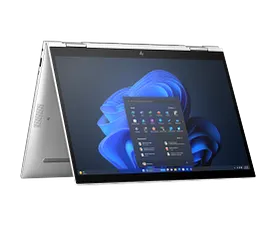
Laptop for typing, tablet for signing, tent for presenting across a desk, stand for watching. One machine changes its posture to fit the moment, without reaching for a second device.
HP Rechargeable Active Pen 3 support
The touch display works with the optional HP Rechargeable Active Pen 3, sold separately — for a signature on a document in front of a client, notes on a PDF or a quick sketch in a meeting, with no scramble for paper.
13.3″ FHD touch with Gorilla Glass 5
An FHD IPS touch panel under Corning Gorilla Glass 5 — glass chosen to take the daily handling of tablet mode and the trip in and out of a bag.
HP Sure View Reflect (option)
On select configurations — a built-in privacy panel with up to 1000 nits that darkens the screen to side viewers at the press of a key. HP pioneered this technology in business laptops.
53 Wh with fast charging
HP Fast Charge returns up to 50% in 30 minutes with the laptop off or in standby and the included 65W USB-C charger — the cushion between two meetings in different offices.
Dual Thunderbolt 4 + HDMI
2× Thunderbolt 4 (USB4, DisplayPort, Power Delivery) plus HDMI 2.0b and 2× USB-A. One cable to an HP docking station, despite the compact 13″ chassis.
Bang & Olufsen + AI microphones
Two Bang & Olufsen speakers and three microphones with AI noise suppression — your voice carries clearly through a video call even when the machine sits in tent mode on the table.
Sensible value as a refurbished laptop
As a used laptop that has passed a technical audit and refurbishment, the HP EliteBook x360 830 G8 gives premium EliteBook class and convertible flexibility well below the price of a new 2-in-1 in the same tier.
HP EliteBook x360 830 G8: a 13.3″ convertible EliteBook with HP Wolf Security business protection
In the premium business 2-in-1 segment, HP runs two separate lines that buyers often confuse. One is the HP EliteBook x360 1030 G8 and 1040 G8 — ultrapremium flagships at the top of the range, rivals to the Lenovo ThinkPad X1 Yoga. The other is the HP EliteBook x360 830 G8, which is something different: it is the standard EliteBook 800 series, simply folded into a convertible chassis. The distinction matters for your decision, because the x360 830 G8 does not pretend to be a luxury ultrabook. It is the same corporate HP EliteBook 840 G8 that IT departments already know, only with a touch display and 360-degree hinges.
In practice that means you get flexibility without giving up the business foundation. The hinges swing all the way around and locks the machine into four modes: a classic laptop for typing documents, tablet for signing or pen notes, tent — screen turned across the table toward a client — and stand for viewing material. For a consultant who spends three days a week at client sites, that is not a gimmick: hand over the tablet for a signature, fold it back to laptop mode, keep typing, all without pulling out a second device. The screen is a 13.3″ FHD IPS touch panel under Corning Gorilla Glass 5 — glass chosen precisely because this panel will be touched, rotated and closed into a bag every day.
The 360-degree hinge itself has a precise birthday. In October 2012, alongside Windows 8, the first laptop arrived whose screen flipped all the way behind the keyboard — and the gesture that looks obvious today was then a sensation people queued around at trade shows. A decade of quiet engineering followed: hinges learned to hold the screen steady under a finger, to survive tens of thousands of rotations, not to loosen with the years. The HP EliteBook x360 830 G8 is a product of that evolution's mature stage — a convertible whose hinge nobody thinks about anymore. Which is precisely the compliment.
Underneath, the platform is the same as the clamshell's: 11th-generation Intel Core (Tiger Lake) with integrated Iris Xe graphics and soldered dual-channel DDR4-3200 up to 32 GB, set at purchase as on most 13″ convertibles; dual-channel is what lets Iris Xe reach its full pace. Security is the whole HP Wolf Security platform: Sure Start Gen6 protects and self-heals the BIOS, Sure Recover Gen4 restores a clean system over the network after a breach, Sure Sense stops unknown malware. Alongside them comes the optional HP Sure View Reflect, and its history is worth telling. HP shipped the first built-in electronic privacy panel on the HP EliteBook 840 G3 and 1040 G3, in partnership with 3M, specifically to solve "visual hacking" — people reading your screen over your shoulder on a plane or train. Until then the only answer was a plastic filter you stuck on top and had to carry separately. Sure View builds that protection into the panel itself and switches on with one key; the Reflect variant on the HP EliteBook x360 830 G8 reaches 1000 nits. For a convertible that often gets used in public spaces, this is the feature that makes a lawyer or financial analyst pick this model in particular.
The build follows the series' corporate logic. The chassis is CNC-machined from aluminium and carries the 360-degree hinges, tested to survive the thousands of rotations between the four modes — the series passes MIL-STD-810H durability testing. The honest trade-off is weight: at a starting ~1.35 kg the HP EliteBook x360 830 G8 weighs about the same as the touch version of the clamshell HP EliteBook 830 G8 and roughly a hundred grams more than the lightest non-touch HP EliteBook 830 G8 — the cost of the touch glass and the rotating construction. If you do not need touch and pen, the plain HP EliteBook 830 G8 or 840 G8 will be lighter; if you want the highest tier with premium display options, that is the territory of the HP EliteBook x360 1040 G8. The Lenovo ThinkPad X13 Yoga Gen 2 is the alternative from the other camp — around 1.30 kg, with a 16:10 screen and a pen that stows and charges inside the chassis — like the x360 830 G8 here, it uses soldered memory, so the deciding extras are the Sure View Reflect option and the EliteBook 800 build. As a refurbished business laptop from ITR Bulgaria, the x360 830 G8 is one of those cases where you buy premium EliteBook class and convertible flexibility in one device — checked, prepared and delivered with a real warranty, rather than just a pre-owned laptop with an unknown past.
Who it's for
Scenarios where the convertible form of the EliteBook 800 series makes the most sense
Consultants with client meetings and signatures
A consultant shows a proposal on the laptop, then flips it into a tablet and hands the screen over for a signature with the optional HP Rechargeable Active Pen 3 — the whole cycle on one machine, with no paper to scan afterwards.
Presenters in tent mode
When the keyboard gets in the way at a small table, tent mode turns the screen toward the other side, with the two halves of the chassis forming an inverted V — a face-to-face presentation, no projector or cables.
Lawyers and pen annotation
A lawyer marks clauses straight onto a PDF in tablet mode, and on a Sure View Reflect configuration dims the screen to the person in the next seat with one key.
Managers with hybrid work
A day in the office on a docking station over Thunderbolt 4, an evening reading reports in stand mode at home — one machine covers both the productive and the light use.
Model highlights
EliteBook 800 in convertible form
The HP EliteBook x360 830 G8 is tier 3 — the standard EliteBook 800 series with touch and 360° hinges. Above it sits the tier 4 flagship HP EliteBook x360 1040 G8; the HP EliteBook x360 830 G8 is not a cut-down version, but a full 800-series model in a 2-in-1 shell.
360° hinges — four modes
Laptop, tablet, tent and stand. A CNC aluminium chassis with hinges built for the thousands of rotations across the machine's life. The series passes MIL-STD-810H testing.
Dual-channel DDR4-3200 up to 32 GB
Soldered dual-channel DDR4-3200 up to 32 GB, set at purchase. Dual-channel is what lets Iris Xe reach full graphics performance.
2× Thunderbolt 4 + HDMI 2.0b
Two Thunderbolt 4 ports (USB4, DisplayPort, Power Delivery), HDMI 2.0b and 2× USB-A 5Gbps (one charging). One cable to an HP docking station even in the compact 13″ chassis.
HP Wolf Security business protection
Sure Start Gen6 (BIOS protection and self-healing), Sure Run Gen4, Sure Recover Gen4, Sure Sense (AI malware protection), Sure Click, TPM 2.0. Availability of individual features depends on the configuration, operating system and licences.
HP Sure View Reflect 1000 nits (option)
A built-in privacy panel that darkens the screen to side viewers at the press of a key — successor to the technology HP introduced first in business laptops. Configured at order, not on every unit.
Two Bang & Olufsen speakers + AI mics
Two Bang & Olufsen speakers and three microphones with HP Dynamic Audio. A 720p webcam with the HP Privacy Camera physical shutter; the IR camera and Windows Hello come with the corresponding configurations.
A logical pick as a refurbished laptop
Premium EliteBook class and convertible flexibility in one, with years of BIOS and driver support from HP. That makes the HP EliteBook x360 830 G8 a strong used laptop once refurbished and delivered with a warranty.
Refurbished by ITR Bulgaria: what value do you get?
Buying a refurbished business-class laptop makes the strongest sense when the device has gone through a standardised internal refurbishment process and arrives with a real warranty. That is how used laptops become refurbished laptops — a practical, predictable and professional alternative to new entry-level machines, or a far more sensible purchase than new premium equivalents.
- ✓ Technical audit and cosmetic assessment of the device according to an internal standard
- ✓ Refurbishment, cleaning, quality improvement and configuration to standard for repeat business use
- ✓ Use of original software and a prepared configuration appropriate to the model
- ✓ Packaging, real warranty and ongoing support for the model from ITR Bulgaria
Ready to browse available units?
The HP EliteBook x360 830 G8 is a refurbished business laptop from the premium EliteBook 800 line in convertible form — checked, prepared and delivered with a warranty from ITR Bulgaria. Browse current stock or get in touch for help.
Additional information
Where does the HP EliteBook x360 830 G8 fit in the series? ▼
HP keeps two convertible lines in its business portfolio, and the HP EliteBook x360 830 G8 belongs to the more accessible one. The premium flagship class (tier 4) holds the HP EliteBook x360 1030 G8 and HP EliteBook x360 1040 G8 — ultrapremium 2-in-1 machines with higher-tier displays, rivals to the Lenovo ThinkPad X1 Yoga and the Dell Latitude 9000 2-in-1. The HP EliteBook x360 830 G8 is tier 3: the convertible version of the core EliteBook 800 series, side by side with the clamshell HP EliteBook 830 G8, HP EliteBook 840 G8 and HP EliteBook 850 G8.
The clearest way to understand it is as an HP EliteBook 830 G8 with a touch display and 360-degree hinges. It shares the platform, the security and the ports of the clamshell 800 series, and adds the four modes of use and pen support. Above it — for those who want the highest tier — is the HP EliteBook x360 1040 G8; the direct non-convertible alternative in the same class is the HP EliteBook 830 G8 (13.3″) or HP EliteBook 840 G8 (14″).
The G8 generation succeeds the HP EliteBook x360 830 G7 (Intel 10th generation) and brings 11th-generation Intel Tiger Lake with Iris Xe graphics and Thunderbolt 4. It remains one of the widely circulated generations on the market thanks to the long corporate life cycle of the EliteBook 800 series.
The HP EliteBook x360 830 G8 is not ideal if… ▼
- You have no need for touch, pen or tablet mode — then you pay for weight and glass you will not use. The standard HP EliteBook 830 G8 (13.3″) or HP EliteBook 840 G8 (14″) is lighter and usually better priced as a refurbished laptop.
- You put minimum weight above everything — the convertible construction and touch glass add grams over the lightest clamshell EliteBooks. For maximum portability, look at the HP EliteBook 840 Aero G8 (magnesium) or the non-touch HP EliteBook 830 G8.
- You want the highest premium 2-in-1 tier with better display options — that is the territory of the HP EliteBook x360 1040 G8 (tier 4), not the HP EliteBook x360 830 G8.
- You need discrete graphics for video editing, 3D or CAD — the HP EliteBook x360 830 G8 relies on integrated Intel Iris Xe. For that kind of work, look at the HP ZBook range.
- You expect a guaranteed Sure View Reflect privacy panel or an IR camera for Windows Hello — these are factory options and are not present on every unit. Check the specific configuration.
- You rely on a built-in RJ45 Ethernet port — the convertible chassis has no full-size network port; wired connection goes through a Thunderbolt 4 dock or a USB-C adapter.
Choosing the right size and form factor ▼
Here the choice is first about construction, then size. The HP EliteBook x360 830 G8 is a 13.3″ convertible — a machine with 360-degree hinges and a touch display that works as a laptop, tablet, in tent and in stand mode. That makes sense if you will actually use at least two of those modes: signing with the pen, presenting across a table, reading in hand.
If you only need a classic laptop (no touch, no hinges): the HP EliteBook 830 G8 (13.3″) is the direct clamshell equivalent — lighter, usually more affordable. The HP EliteBook 840 G8 (14″) gives more screen area for the same business use.
If you want a higher-tier 2-in-1: the HP EliteBook x360 1040 G8 is the premium flagship (tier 4) with better display options and a larger 14″ screen.
Construction: the HP EliteBook x360 830 G8 chassis is CNC-machined from aluminium, with 360-degree hinges and a thickness of about 17.9 mm. The series passes MIL-STD-810H durability testing — standard for the EliteBook 800 line.
Alternative models ▼
Within HP:
HP EliteBook 830 G8 — the clamshell equivalent on the same platform. Lighter, no touch or hinges, usually more affordable as a refurbished laptop. Trade-off: you lose the four modes and the pen. A logical pick if you have never used tablet mode.
HP EliteBook x360 1040 G8 — the premium flagship (tier 4) of the convertible line. A larger 14″ screen and higher-tier display options. Usually at a higher refurbished price. For those who want the best 2-in-1, not the balanced one.
HP EliteBook x360 830 G7 — the previous generation (Intel 10th generation). A more affordable option. Trade-off: older UHD graphics instead of Iris Xe, Thunderbolt 3 instead of TB4.
Cross-brand alternative (13.3″ convertible, premium business class, Gen 11):
Lenovo ThinkPad X13 Yoga Gen 2 (Intel) — the other serious 13″ business 2-in-1 of the generation. Around 1.30 kg (slightly lighter), with a 16:10 screen and a pen that stows and charges inside the chassis. Trade-off: both use soldered memory with no upgrade, so the HP EliteBook x360 830 G8 answers instead with the Sure View Reflect option.
Note: do not compare the HP EliteBook x360 830 G8 with standard clamshell models like the HP ProBook 440 G8 or Dell Latitude 3420 — they are a different class and form factor. Convertible comparisons only make sense against other 2-in-1 machines.
Refurbished by ITR Bulgaria: what value do you get? ▼
The HP EliteBook x360 830 G8 is a model where refurbishment has clear logic. As part of the EliteBook 800 series it uses the same standardised components and an accessible interior — the M.2 NVMe SSD is replaceable, so storage can be upgraded during preparation. The LPDDR4x memory, by contrast, is soldered and set at purchase. That makes the technical audit and configuration straightforward.
Add to that the wide corporate spread of the EliteBook series — spare parts, original chargers and HP docking stations stay available on the market years after the model's release, and HP supports the BIOS and drivers for a long time. After passing the standardised refurbishment process, the model is prepared for repeat business use and arrives with a real warranty and support from ITR Bulgaria — a practical used laptop with predictable support.
Frequently asked questions ▼
What is the difference between the HP EliteBook x360 830 G8 and the regular HP EliteBook 830 G8?
The HP EliteBook x360 830 G8 is the same platform in a convertible chassis: it adds a touch display, 360-degree hinges (four modes) and HP Active Pen support. The standard HP EliteBook 830 G8 is a classic laptop — lighter, no touch, usually more affordable as a refurbished laptop. The security and the ports are the same on both; on the HP EliteBook x360 830 G8 the DDR4-3200 memory is soldered, up to 32 GB.
Is the HP EliteBook x360 830 G8 HP's premium flagship among 2-in-1 models?
No — that is the HP EliteBook x360 1040 G8 (and HP EliteBook x360 1030 G8). The HP EliteBook x360 830 G8 is tier 3, the convertible version of the core EliteBook 800 series. That matters for the choice: you get the full 800-class business foundation, but without the flagship's premium display options — and at a more sensible price.
Can you add memory to the HP EliteBook x360 830 G8?
No — the DDR4-3200 memory is soldered to the board, up to 32 GB, and is set at purchase, as on most 13″ 2-in-1 machines. Choose the RAM you need up front. The M.2 NVMe SSD, on the other hand, is replaceable.
Is the HP EliteBook x360 830 G8 a good choice as a used laptop?
For a user who genuinely uses the convertible form — yes. You get premium EliteBook security and the flexibility of four modes in one device, with years of HP support and accessible parts. As a refurbished laptop from the business class, it gives access to a far higher-tier machine than a new entry-level 2-in-1 at a similar price. If you will not use touch and pen, though, the plain HP EliteBook 830 G8 is the more sensible buy.
What configurations are found on the HP EliteBook x360 830 G8?
The model is found with 11th-generation Intel Core i5 or i7 (some with vPro), RAM up to 32 GB DDR4-3200 (soldered), and NVMe SSD up to 2 TB. Select units may carry: the HP Sure View Reflect 1000-nit privacy panel, an IR camera for Windows Hello, a fingerprint reader, a 4G LTE or 5G WWAN module. It is important to check the specific unit.