
 EN
EN BG
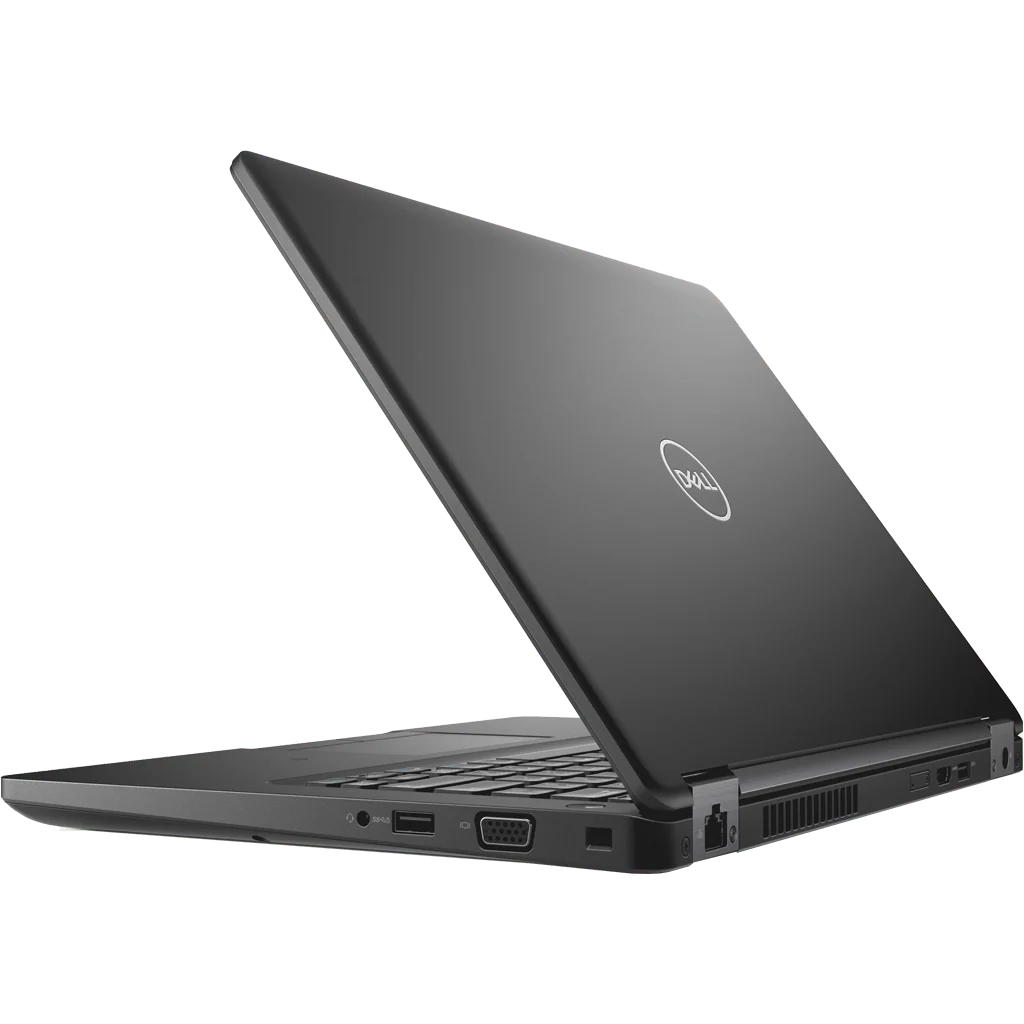
BGDell Latitude 5490 14-inch mainstream business laptop from the Latitude 5000 series
The Dell Latitude 5490 is the 14-inch workhorse of the mainstream Latitude 5000 series, the line Dell ships to corporate customers in the largest volume. As a refurbished business laptop from ITR Bulgaria, it is one of the sensible picks for companies equipping staff at scale who want a standardized, easy-to-service configuration.
Benefits
Why the Dell Latitude 5490 makes sense as a refurbished business laptop from the mainstream Latitude series
Mainstream Latitude 5000
The series Dell sells in the largest volume to corporate customers, above entry-level 3000 and below the flagship 7000. This is the tier for equipping entire offices at once.
Carbon-fibre reinforced lid, from 1.60 kg
Starting weight around 1.60 kg in an aluminium body that passes MIL-STD-810G durability testing. Comfortable to carry day to day in an office setting.
2× SO-DIMM up to 32 GB DDR4
Two DDR4-2133/2400, depending on the processor slots you can actually upgrade after purchase, something the thinner premium models give up with soldered RAM. Real headroom for companies that keep machines for years.
8th gen Kaby Lake-R + vPro options
Intel Core i5-8250U/8350U or i7-8550U/8650U. The vPro options (i5-8350U, i7-8650U) give IT remote management across a whole fleet of machines.
Optional NVIDIA MX130 2 GB
Some configurations add a discrete GeForce MX130 with 2 GB, enough for smoother video and light GPU acceleration in everyday applications.
51 Wh + Dell ExpressCharge
51 Wh battery with ExpressCharge, up to about 80% in an hour with the supplied compatible charger, the laptop off and ExpressCharge mode enabled. A larger 68 Wh ExpressCharge option and a smaller 42 Wh ExpressCharge option for configurations without discrete graphics also exist, along with a 68 Wh Long Cycle Life option without ExpressCharge.
720p webcam with privacy shutter
An HD webcam with a physical privacy shutter, so you close the lens with a finger when you are off camera. A small but real touch for daily video calls.
Full-size RJ45 and 3× USB-A
A built-in wired Ethernet port, 3× USB-A 3.1, HDMI 1.4 with integrated graphics or HDMI 2.0 with the MX130 and an optional smart card reader. Covers offices where wired networking and ID cards are still part of the day.
TPM 2.0 and central management
TPM 2.0 as standard and optional Dell ControlVault 2, with an optional fingerprint reader. Paired with Dell Command Update, rolling one image across a whole fleet stays simple.
Value as a refurbished laptop
As a used business laptop from a standardized corporate line with widely available parts, the Dell Latitude 5490 is among the low-risk candidates for refurbishment. You know exactly what you are getting.
Dell Latitude 5490: the popular 14-inch mainstream Latitude for corporate fleets
There are laptops you will run into almost everywhere on the used market, and the Dell Latitude 5490 is one of them. Between the entry-level Latitude 3000 and the flagship 7000 sits the mainstream 5000 line, the one Dell ships to corporate customers in the largest volume. The 5490 is its 14-inch representative: the machine IT departments ordered in big batches, with the same configuration, to equip whole offices at once. That scale of deployment is exactly why it is so common today as a refurbished business laptop. The standardized configuration and widely available parts mean you know exactly what you are getting, and refurbishing it is straightforward.
The story of the Dell Latitude 5490 is not really its own; it is the story of the whole Latitude line at a turning point. Until shortly before this generation, business Latitude machines carried the letter "E" in the name (for example, the E5470) and docked through Dell's own E-Port connector on the underside, a design that had defined Dell's corporate laptops for close to a decade. Around the 5480/5490 generation Dell dropped both the letter and the old dock connector, moving to a cleaner aluminium body and cable docking. The 5490 comes from the first wave of that more modern Latitude design: an aluminium body about 20.8 mm thick that passes MIL-STD-810G durability testing. For IT the difference is practical. The simpler construction and the removal of the fragile dock connector mean fewer points of failure and easier parts replacement after years of use. That is a big part of why so many companies standardized their fleets around it.
One review from those years described the machine with a phrase that has followed it like a business card since: “the notebook equivalent of a safe.” Nothing about the Dell Latitude 5490 is designed to impress in a shop window — everything is designed not to break, not to leak and not to surprise. A carbon-reinforced lid, military testing, a smartcard reader for stricter organizations, an optional fingerprint sensor. Precisely that boring dependability explains why the machine is so common on the second-hand market: companies bought it by the thousands, and it declined to break down on schedule.
Under the hood, the Dell Latitude 5490 runs on Intel's 8th gen Kaby Lake-R platform: Core i5-8250U and i5-8350U, or i7-8550U and i7-8650U in the stronger configurations, with the vPro options giving IT remote management across an entire fleet. Graphics are integrated Intel UHD 620, and some units add a discrete NVIDIA GeForce MX130 with 2 GB, enough for smoother video and light GPU acceleration without being a gaming card. The model's long-term strength, though, lies in two things the premium lines give up for thinness: two SO-DIMM slots for DDR4 memory up to 32 GB, and a replaceable M.2 NVMe SSD. That means a real upgrade after purchase. A company that buys once and runs the machine for five years can double the memory instead of replacing the laptop. Add a 51 Wh battery with Dell ExpressCharge (80% in about an hour), a 720p webcam with a physical privacy shutter, and a full-size RJ45 port, and you get a machine that handles standard office work without complications.
The honest trade-off is clear: the Dell Latitude 5490 has no Thunderbolt. Driving several monitors and all your peripherals over a single dock cable is simply not on the table here. If that is what you need, the HP ProBook 640 G4 in the same mainstream class offers an optional Thunderbolt 3 (with vPro processors), though it is heavier at around 1.69 kg versus roughly 1.51 kg for the Dell Latitude 5490. If you want the classic ThinkPad keyboard, TrackPoint and ThinkShield security, the direct rival is the Lenovo ThinkPad L480. And if you need more screen for spreadsheets and multi-window work, the Dell Latitude 5590 is the 15.6-inch version of the same platform. For a mobile corporate user who works mainly with documents, business systems and video calls, the 5490 covers the need without unnecessary compromises. As a refurbished laptop from ITR Bulgaria, the standardized configuration and easily sourced parts make it one of the low-risk candidates for refurbishment: a used laptop that has been through a technical audit, cleaning and configuration, backed by a real warranty.
Who it suits
Scenarios where the Dell Latitude 5490 makes the most sense
Mid-sized corporate fleet
A company equipping 50 to 200 staff with identical machines. The standardized configuration and available parts make rolling out and maintaining the whole fleet a manageable task for the IT team, not a headache.
Standard office work
A staff member juggling documents, a browser with dozens of tabs, an ERP or CRM system and video calls. The 8th gen platform with UHD 620 and up to 32 GB of SO-DIMM memory keeps that pace comfortably.
IT departments with central management
A team deploying one image across hundreds of machines. TPM 2.0 and the optional Dell ControlVault 2 provide different security tools; vPro configurations support remote management with the right setup. Dell Command | Update handles drivers, BIOS and firmware. A common image and central management require the appropriate tools and organisation from the IT team.
Long deployments with easy parts
A company that buys once and keeps the machines for five years. The two SO-DIMM slots and the replaceable NVMe SSD leave room to upgrade, and widely available parts make service predictable.
Model highlights
Mainstream Latitude 5000
The highest-volume series in Dell's business portfolio, above entry-level Latitude 3000 and below the flagship 7000. The standard 14-inch format for a corporate fleet.
8th gen Kaby Lake-R platform
Intel Core i5-8250U/8350U or i7-8550U/8650U, with vPro options (i5-8350U, i7-8650U) for remote fleet management. Entry units may carry a 7th gen chip.
2× SO-DIMM up to 32 GB DDR4
Memory you can actually upgrade after purchase: two slots, no soldered modules. The replaceable M.2 NVMe SSD adds further room to expand within the same machine.
Optional NVIDIA MX130 2 GB
On some configurations, a discrete GeForce MX130 with 2 GB sits above the integrated Intel HD 620 with 7th-gen Core or UHD 620 with 8th-gen Core: light GPU acceleration for smoother video and everyday applications.
51 Wh battery with ExpressCharge
Dell ExpressCharge returns up to about 80% in an hour with the supplied compatible charger, the laptop off and the mode enabled. Depending on configuration, a 42 Wh ExpressCharge option without discrete graphics and a larger 68 Wh ExpressCharge option also turn up for a longer day. A 68 Wh Long Cycle Life battery without ExpressCharge is also available.
Carbon-fibre reinforced lid, from 1.60 kg
An aluminium body about 20.8 mm thick that passes MIL-STD-810G testing. The simpler build, with no proprietary dock connector, means fewer vulnerable points.
Ports for the corporate desk
A full-size RJ45 Ethernet, 3× USB-A 3.1, HDMI 1.4, an SD reader and an optional smart card reader. The 720p webcam comes with a physical privacy shutter.
A logical refurbished choice
The standardized corporate configuration and widely available parts put the Dell Latitude 5490 among the low-risk models to refurbish. As a pre-owned laptop in business class, it ships with a real warranty from ITR Bulgaria.
Refurbished by ITR Bulgaria: what value do you get?
Buying a refurbished business-class laptop makes the most sense when the device has been through a standardized internal refurbishment process and ships with a real warranty. That is how used laptops become refurbished laptops, a practical and professional alternative to new budget machines, or a far more sensible buy than a new premium equivalent.
- ✓ Technical audit and cosmetic grading of the device to an internal standard
- ✓ Refurbishment, cleaning, quality improvement and configuration to a standard for repeat business use
- ✓ Use of genuine software and a configuration prepared for the model
- ✓ Packaging, a real warranty and model support from ITR Bulgaria
Ready to see what is in stock?
The Dell Latitude 5490 is a refurbished business laptop from the mainstream Latitude 5000 series, checked and prepared for corporate use. Browse current availability or contact us for help.
Additional information
Where does the Dell Latitude 5490 fit in the series? ▼
The Dell Latitude 5490 belongs to the Latitude 5000 series, Dell's mainstream business line and the one with the largest corporate sales volume. In the Latitude hierarchy, the 5000 sits above the 3000 (entry business) and below the 7000 (the flagship premium line). That makes it a direct rival to the HP ProBook 600 series and the Lenovo ThinkPad L series: mainstream business class, not premium.
Within this generation, the 14-inch format sits between the more compact 12.5-inch Dell Latitude 5290 and the 15.6-inch Dell Latitude 5590. There is also a higher-performance variant, the Dell Latitude 5491, with a name ending in "1": it carries a Coffee Lake-H processor with four cores on the Core i5 or six on the Core i7, for heavier workloads. The base Dell Latitude 5490 stays the most common, balanced pick for standard office work.
The Dell Latitude 5490 is not ideal if… ▼
- You rely on a device or docking station that requires Thunderbolt: the Dell Latitude 5490 has no such port. For several monitors and peripherals over one cable there is USB-C docking, for example the compatible Dell WD15 with up to two external monitors depending on their configuration. If you specifically need Thunderbolt 3, the Dell Latitude 5491 offers it as an option; check the specific unit.
- You need workstation power or serious discrete graphics for video editing, CAD or 3D. For that, the Dell Precision line is the logical choice. The optional MX130 is light acceleration, not a professional GPU.
- You want a 15.6-inch or larger screen for roomy spreadsheet work. The Dell Latitude 5590 is the 15.6-inch version of the same platform.
- Your priority is minimum weight and a premium chassis. The flagship Latitude 7000 series is lighter and thinner, with higher-class materials (but a higher price as a refurbished laptop).
- You need a guaranteed specific configuration (an exact CPU, RAM, SSD, display, discrete graphics or a Privacy Screen panel). Configurations vary, so it is important to check the specific unit.
Which size and form factor should you choose? ▼
The 14-inch class is traditionally the most balanced for business use: enough screen area for documents and video calls, at a starting weight around 1.60 kg. That is exactly where the Dell Latitude 5490 sits.
12.5-inch class (Dell Latitude 5290): more compact and lighter, for users who prioritise minimum bulk. Trade-off: less screen working space.
15.6-inch class (Dell Latitude 5590): more screen area for spreadsheet or multi-window work, in a heavier body. A good fit for work mostly at a desk.
Form factor: the Dell Latitude 5490 is a clamshell laptop with no 360-degree hinges. If you need touch and a tablet mode, the convertible in this generation is the 12.3-inch Dell Latitude 5290 2-in-1 with a detachable keyboard (a different form factor for a different scenario).
Alternative models ▼
Within Dell:
Dell Latitude 5590 — the 15.6-inch version of the same platform. Same mainstream logic, more screen and a heavier body. A logical pick if you mostly work at a desk with spreadsheets.
Dell Latitude 5491 — a 14-inch variant with a name ending in "1": a Coffee Lake-H processor with four cores on the Core i5 or six on the Core i7, configured by Dell with a 35 W TDP, and 51 or 68 Wh battery options. More powerful than the Dell Latitude 5490, but also heavier, for more demanding workloads.
Dell Latitude 5400 — the successor (8th gen Whiskey Lake, revised chassis). A more current platform, usually at a higher price as a refurbished laptop.
Cross-brand alternatives (14″, mainstream business class):
HP ProBook 640 G4 — a direct mainstream rival. It offers an optional Thunderbolt 3 (with vPro processors), which the Dell Latitude 5490 lacks, but it is heavier at around 1.69 kg. A logical choice if Thunderbolt docking matters.
Lenovo ThinkPad L480 — a mainstream Lenovo ThinkPad in the same class. It brings the classic Lenovo ThinkPad keyboard, the TrackPoint and ThinkShield security. In return, the Dell Latitude 5490 leans on standardization and easily sourced parts in a Dell environment.
Note: do not compare the Dell Latitude 5490 with the Dell Latitude 7420 or HP EliteBook 840 G5 — those sit in a higher premium business class with a different target group.
Refurbished by ITR Bulgaria: what value do you get? ▼
The Dell Latitude 5490 is a model where refurbishment by ITR Bulgaria has especially clear logic. Precisely because it was deployed in huge volume with the same corporate configuration, parts are widely available and servicing it is familiar and simple, so the risk in refurbishment is low and the result is clear.
After it has been through the refurbishment, the used laptop is prepared for repeat business use: technical audit, cleaning, configuration, genuine software and packaging with a real warranty. For companies equipping their staff, that is the difference between an unchecked used device and a refurbished business laptop with real support from ITR Bulgaria.
Frequently asked questions ▼
Is the Dell Latitude 5490 a good choice as a used laptop?
Yes, and for a specific reason. The Dell Latitude 5490 was deployed in huge quantities with the same corporate configuration, so parts are widely available and refurbishing it is straightforward. As a refurbished laptop from the mainstream business class, it gives you a more serious machine than a new budget laptop at a comparable price, at low risk.
Can the memory of the Dell Latitude 5490 be upgraded?
Yes. Unlike the thinner premium models with soldered memory, the Dell Latitude 5490 has two SO-DIMM slots for DDR4, supporting up to 32 GB per Dell's specification. The speed is 2400 MHz with 8th gen Core and 2133 MHz with 7th gen. The SSD is also replaceable (M.2 NVMe). That gives a real path to expand within the same machine.
Does the Dell Latitude 5490 have Thunderbolt?
No. The Dell Latitude 5490 has no Thunderbolt, but its USB-C port supports DisplayPort and a compatible USB-C dock such as the Dell WD15 with up to two external monitors depending on their configuration. There is also VGA, HDMI 1.4 with integrated graphics or HDMI 2.0 with the MX130, and USB-A ports; wired networking runs over the full-size RJ45. If you specifically need Thunderbolt 3, the Dell Latitude 5491 offers it as an option; check the specific unit.
What configurations does the Dell Latitude 5490 come in?
The model comes in a wide range: Intel Core i5 or i7 from the 8th generation (some with vPro), and entry units on the 7th generation; RAM from 8 to 32 GB; an NVMe SSD in various capacities. Some units offer a discrete NVIDIA MX130, a fingerprint reader, an FHD display or a Privacy Screen panel. It is important to check the specific unit.