
 EN
EN BG
BG
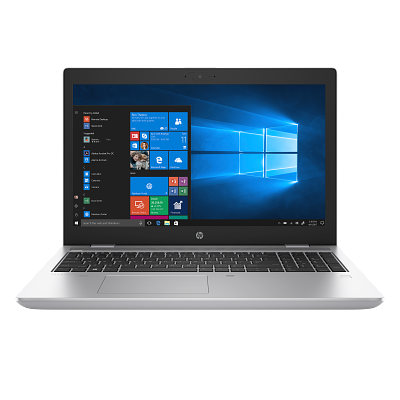
HP ProBook 650 G5 The 15.6-inch mainstream ProBook with a numeric keypad, built for fixed desk work
For teams that work mostly at a desk and handle numeric data every day, a large 15.6″ screen and a dedicated numeric keypad stay a practical ask. The HP ProBook 650 G5 covers exactly that profile at HP's mainstream level — the larger sibling of the 14-inch 640 G5, in a wider chassis that makes room for a numpad. As a refurbished business laptop from ITR Bulgaria, it is a sensible pick for equipping fixed workstations.
Benefits
Why the HP ProBook 650 G5 makes sense for desk-based numeric work on a large screen — as a refurbished laptop
15.6″ screen with a numeric keypad
The full-size keyboard with a dedicated numpad is the difference for someone who keys in numbers all day — fingers find the digits without looking, and the wide screen fits a spreadsheet without horizontal scrolling.
720p IR camera for Windows Hello (option)
On configurations with the IR camera you sign in with a glance, no password, and the same camera handles video calls. In the mainstream 15.6″ class this is not a given — entry models often go without it.
USB-C for single-cable docking
One USB-C port with USB 3.1 Gen 1 (5 Gbit/s), DisplayPort 1.2 and Power Delivery carries data, video and power over the same cable with a compatible docking station. At a fixed desk that means one motion — hook the machine to a dock and it becomes a desktop with external monitors, network and keyboard.
Full-size ports and RJ45
2× USB-A 3.1 Gen 1, HDMI and a full-size RJ45 Ethernet port — no dongles. In offices still running on wired networks and older peripherals, that saves a drawer of adapters at every workstation.
DDR4 upgrade to 64 GB (2× SO-DIMM)
Two SO-DIMM slots with DDR4-2400 memory allow an upgrade to 64 GB after purchase. For a team that keeps dozens of tabs and several Excel files open at once, that headroom is added without swapping the machine.
HP Wolf Security components
The series carries part of HP's business protection — Sure Start for BIOS self-recovery, Sure Sense, Sure Click, Sure Run and BIOSphere Gen5, alongside TPM 2.0. A hardware-backed base that IT teams understand and support easily.
48 Wh battery with HP Fast Charge
HP Fast Charge returns 50% in about 30 minutes with the laptop off or in standby and an adapter of at least 65 W. For a machine that spends its day near an outlet, fast top-ups between meetings matter more than maximum runtime away from power.
Spill-resistant keyboard with optional backlighting
The keyboard is spill-resistant, and backlighting is optional. The large chassis has room for a full layout with a numpad — quiet, comfortable typing through long hours of document and spreadsheet work.
HP Sure View Gen3 (option)
On select configurations — an integrated HP Sure View Gen3 privacy panel, rated at a nominal 1000 nits in the non-touch version, that, at the press of a key, dims the screen for side viewers. Useful when working with personal or financial data in open-plan offices.
Sensible value as a refurbished laptop
As a used laptop that has gone through a technical audit and refurbishment, the HP ProBook 650 G5 gives you a business-class machine at a more reasonable price — a practical choice when several identical workstations need equipping.
HP ProBook 650 G5: the 15.6-inch mainstream ProBook with numeric keypad and IR camera
Among the 15.6-inch mainstream business laptops of its generation, the ProBook 650 G5 holds a position that no single spec settles — it is the whole usage profile that does. On the same shelf sit the Dell Latitude 5500 and the Lenovo ThinkPad L590, three machines for one kind of buyer: the team that works mostly at a desk and wants a large screen with a dedicated numeric keypad. The HP ProBook 650 G5 is the bigger sibling of the 14-inch 640 G5 — the same architecture stretched into a wider chassis that makes room for a numpad and a second monitor in the user's head.
The numeric keypad is not a small detail in this class. For an accountant entering figures and reconciling tables all day, a separate number block is the difference between keying by feel and constantly moving the hand. On top of that, the HP ProBook 650 G5 adds two things entry 15.6″ machines often skip: an optional 720p IR camera and a side connector for the HP UltraSlim Docking Station. The IR camera unlocks Windows Hello — you sign in with a glance — and is also the eye for video meetings. That matters precisely when the day runs in Teams or Zoom: the image in front of the client is the camera's job, not a matter of luck.
The ProBook line exists for a clear reason. HP split its business portfolio into two lines: EliteBook on top — the all-metal flagships with the full security stack — and ProBook below, the workhorse for small and mid-size firms and for corporate fleets that want a business build and manageability without the premium price. ProBook replaced HP's older business notebook series, and over time the 600 class settled at the top of the line, closest to EliteBook in features. You can see it in the build: the lid is aluminium, the base is a polymer composite — a hybrid typical of the 600 class. Metal where you touch and see it; composite where it saves weight and cost. The chassis passes MIL-STD-810G testing — not for the marketing line, but because an office machine lives with spills, knocks in a bag and thousands of lid openings.
One quiet advantage sets the 600s apart from nearly everything else on the market: the optional serial port. RS-232 — the nine pins from the teletype era — sounds like a museum piece, but across workshops, warehouses and service bays there still lives a whole world of machines, tills and measuring instruments that speak only that language. Most makers abandoned the port long ago; HP kept it in the 650s precisely because it knows who buys them. A laptop that can connect to the brand-new projector and to a twenty-year-old lathe alike — that is the definition of a working tool without tantrums.
The platform is Intel's Whiskey Lake-U generation with integrated UHD Graphics 620, and part of the lineup ships with vPro for centralized management. A curious detail: HP listed the model in its 9th-gen ProBook wave, but the silicon is Whiskey Lake-U — that is, Intel Core 8th generation — worth knowing if you compare by generation number. For office tasks, a browser full of tabs, ERP and CRM systems and video conferencing, this platform does its job; it is not a machine for video editing or 3D. Memory is DDR4-2400 across two SO-DIMM slots with an upgrade to 64 GB, and storage is an M.2 NVMe SSD, including a 2 TB option listed in the service guide, with a 2.5-inch drive also possible depending on configuration. Both are accessible for replacement, which keeps refurbishment and support straightforward.
An honest word on the trade-off: the HP ProBook 650 G5 is a stationary machine. Around 2.05 kg and a 48 Wh battery are not a profile for a full day away from an outlet — if the team carries the laptop constantly and works unplugged, the direct rival Dell Latitude 5500 offers a larger 68 Wh battery and is the more natural choice for that use. The ThinkPad L590 is the alternative if the ThinkPad keyboard and TrackPoint are the deciding factor. And against the entry HP ProBook 450 G6, the difference is exactly here — the 450 G6 usually goes without an IR camera and without a side docking connector. As a refurbished business laptop from ITR Bulgaria, the ProBook 650 G5 has one concrete advantage: the 600 class is easy to service, parts and chargers are widely available, and after a technical audit and refurbishment the machine ships with a real warranty. For a company looking at used business laptops to equip staff on fixed workstations, that is the more sensible form of such a purchase than an ordinary second-hand device.
Who it suits
Scenarios where the HP ProBook 650 G5 makes the most sense
Desk-based teams working with numbers
A data operator who spends the shift in front of tables, keying in figures all day on the dedicated number block without looking away from the screen. The machine stays on the desk — weight is irrelevant, typing comfort is not.
Accounting and analysis on a large screen
An accountant or analyst keeping a wide table, an ERP window and a report open at once. The 15.6″ area fits more columns without scrolling, and a compatible USB-C dock adds a second monitor when the reports become two.
Video meetings with Windows Hello
On configurations with the IR camera, the employee opens the laptop and signs in with a glance, and the same camera handles daily Teams calls. DTS:X Ultra audio processing helps the voice come through clearly on the other end.
Corporate fleet on fixed workstations
An IT department equipping a call center, back office or accounting team with identical machines. Wolf Security components, the vPro option and available parts make mass support simpler and more predictable for the budget.
Model highlights
15.6″ 16:9 display with numeric keypad
A large 15.6-inch 16:9 screen with a full-size keyboard and a dedicated numpad. Panel options reach FHD IPS, and on select configurations a high-brightness Sure View privacy panel.
Intel Whiskey Lake-U + UHD 620
Intel Whiskey Lake-U platform (Core 8th generation) with integrated UHD Graphics 620. vPro option on part of the lineup. Enough for office work, browser, ERP and CRM.
1× USB-C + 2× USB-A + HDMI
One USB-C with USB 3.1 Gen 1 (5 Gbit/s), DisplayPort 1.2 and Power Delivery for compatible single-cable docking, plus two USB-A 3.1 and HDMI 1.4b. Enough connections for a desktop setup with external monitors and peripherals, no dongles.
Full-size RJ45 Ethernet
A built-in full-size RJ45 port — wired network without an adapter. In offices with fixed infrastructure that is the more stable, often more secure connection than Wi-Fi 5.
DDR4-2400 up to 64 GB (2× SO-DIMM)
Two SO-DIMM slots with DDR4-2400 memory and official support for up to 64 GB in the later QuickSpecs. Storage includes an M.2 NVMe SSD, with a 2 TB option also listed in the service guide, plus a possible 2.5-inch drive depending on configuration. Memory and storage devices are accessible for replacement.
720p IR camera (option) for Windows Hello
On configurations with the IR camera — biometric face sign-in and a privacy shutter to physically close the lens. The camera also handles everyday video meetings.
HP Wolf Security + TPM 2.0
Sure Start (BIOS self-recovery), Sure Sense, Sure Click, Sure Run and BIOSphere Gen5, with TPM 2.0. Fingerprint reader and smart card options on part of the lineup.
48 Wh battery, Fast Charge, DTS:X Ultra
A 48 Wh battery with HP Fast Charge (50% in about 30 minutes) and stereo speakers with DTS:X Ultra. A profile for work near an outlet, with quick top-ups between tasks.
Refurbished by ITR Bulgaria: what value do you get?
Buying a refurbished business-class laptop makes the most sense when the device has gone through a standardized internal refurbishment process and ships with a real warranty. That is how used laptops become refurbished laptops that can be a practical, professional alternative to new budget machines, or a far more reasonable purchase than new premium equivalents.
- ✓ Technical audit and cosmetic grading of the device against an internal standard
- ✓ Refurbishment, cleaning, quality improvement and configuration to a standard for repeat business use
- ✓ Use of genuine software and a configuration prepared for the model
- ✓ Packaging, a real warranty and model support from ITR Bulgaria
Ready to browse the available units?
The HP ProBook 650 G5 is a refurbished business laptop from the mainstream ProBook 600 line — a 15.6″ screen with a numeric keypad, tested, prepared and delivered with a warranty from ITR Bulgaria. Browse current stock or contact us for help.
Additional information
Where the HP ProBook 650 G5 fits in the series ▼
The HP ProBook 650 G5 belongs to the ProBook 600 series — the upper part of HP's mainstream business line. Above it sits the EliteBook 800 series (premium business, all-metal chassis, the full Wolf Security stack), and below it the ProBook 400 series (entry business) and the consumer lines. The ProBook 600 is closest to EliteBook in business features, but at a more accessible level.
Within the 600 class of this generation, HP offers two size versions: the HP ProBook 640 G5 (14″, no numeric keypad, more compact and lighter) and the HP ProBook 650 G5 (15.6″, with a dedicated numpad, aimed at desk work). The architecture is shared — the difference is chassis size and the presence of a number block.
Across generations, the HP ProBook 650 G5 is the successor to the HP ProBook 650 G4 and the predecessor of the HP ProBook 650 G7. The difference between generations is mainly the platform (processor generation, ports, minor chassis changes), not the product role — all three remain 15.6″ mainstream ProBooks for stationary work.
The HP ProBook 650 G5 is not ideal if… ▼
- You carry the laptop constantly and work long stretches unplugged — around 2.05 kg and a 48 Wh battery are a desk profile. For a mobile scenario, look at the 14-inch HP ProBook 640 G5 or the Dell Latitude 5500 with its optional larger 68 Wh battery.
- You need a more powerful discrete graphics card for video editing, 3D or CAD — the HP ProBook 650 G5 offers integrated Intel UHD Graphics 620 and an optional Radeon 540X with 2 GB GDDR5. For those tasks, look at the HP ZBook series.
- You want a 2-in-1 with a tablet mode — this is a standard clamshell laptop without 360-degree hinges. A touchscreen is offered as an option, but it does not turn the model into a convertible.
- You expect a guaranteed IR camera, Sure View privacy panel, fingerprint reader or 4G LTE — these are options configured at the factory and not present on every unit. Always check the specific configuration.
- You are counting on more than 64 GB of RAM or over 2 TB on a single SSD without a prior compatibility check — the later QuickSpecs list up to 64 GB DDR4 in the two SO-DIMM slots, and the service guide includes a 2 TB M.2 NVMe SSD. Larger capacities need a separate check; these catalogue values do not prove an absolute physical ceiling.
- You require a guaranteed specific configuration (a particular CPU, a display with a set brightness, vPro) — configurations vary considerably between units.
Choosing the right size and construction ▼
15.6-inch class (HP ProBook 650 G5): a large work area and a full-size keyboard with a dedicated numeric keypad. Suited to desk-based work, accounting, analysis and multi-window tasks. Trade-off: around 2.05 kg — less convenient for frequent carrying.
14-inch class (HP ProBook 640 G5): the same 600-class architecture in a more compact, lighter chassis, without a numeric keypad. The better choice if the machine moves often between offices and meetings.
Construction: the lid is aluminium, the base is a polymer composite (a hybrid typical of the 600 class). The chassis passes MIL-STD-810G testing for durability in everyday office use — spills, knocks in a bag, repeated lid openings.
Display options: from HD to FHD IPS, and on select configurations a high-brightness FHD IPS or a Sure View privacy panel. At purchase it is worth checking which panel option a given unit carries.
Alternative models ▼
Within HP:
HP ProBook 640 G5 — the 14-inch sibling from the same generation. Same architecture, no numeric keypad, more compact and lighter. The better choice for mobile use; the HP ProBook 650 G5 wins for desk work and numeric data.
HP ProBook 450 G6 — entry 15.6″ from the HP ProBook 400 series. More affordable, but usually without an IR camera and without a side docking connector. Reasonable if budget leads and biometrics and the side dock are not needed.
HP ProBook 650 G4 / HP ProBook 650 G7 — the previous and next generation of the same model. The G4 is a more affordable refurbished option; the G7 brings a more current platform. Both remain 15.6″ mainstream HP ProBooks with the same role.
HP EliteBook 850 G6 — premium 15.6″ from the same period. All-metal chassis, a fuller security stack and a better screen, but a higher class and price.
Cross-brand alternatives (15.6″, mainstream business class):
Dell Latitude 5500 — the direct 15.6″ mainstream rival. It offers a larger 68 Wh battery, which makes it the more natural choice if the machine is used for long stretches unplugged. The trade-off against the HP ProBook 650 G5 is a matter of battery and ecosystem, not class.
Lenovo ThinkPad L590 — a 15.6″ mainstream Lenovo ThinkPad. The choice here usually comes down to the keyboard and TrackPoint — the classic Lenovo ThinkPad typing feel. Similar business class, a different working philosophy.
Note: do not compare the HP ProBook 650 G5 with the HP EliteBook 850 on price one-to-one — they are from different tiers (mainstream versus premium) and have different target groups.
Refurbished by ITR Bulgaria: what value do you get? ▼
The HP ProBook 650 G5 is one of those models where refurbishment by ITR Bulgaria has clear practical logic. The 600 class was designed with a long corporate life in mind — the interior is accessible for service, and the M.2 NVMe SSD and SO-DIMM memory are relatively easy to replace. That makes the technical audit and refurbishment faster and more predictable for the budget.
Add the wide spread of the 600 series: chargers, batteries and docking stations are easy to find on the market even years after the model's release. That makes the HP ProBook 650 G5 a practical used laptop with long-term support. After refurbishment, the machine is prepared for repeat business use and ships with a real warranty and support from ITR Bulgaria.
Frequently asked questions ▼
Is the HP ProBook 650 G5 a good choice as a used laptop?
Yes, for a specific usage profile — stationary work with numbers and tables on a large screen. The numeric keypad, the optional IR camera and Thunderbolt 3 set it apart from entry 15.6″ machines, and the 600 class is easy to service. As a refurbished laptop it gives you a business-class machine at a more accessible price for equipping fixed workstations.
Is the HP ProBook 650 G5 a 9th-generation Intel laptop?
HP listed the model in its 9th-gen ProBook wave, but the actual silicon is Intel Whiskey Lake-U — that is, Core 8th generation. This is useful to know when comparing by generation number. In practice, for office tasks, a browser, ERP, CRM and video meetings the platform does its job comfortably.
What is the difference between the HP ProBook 650 G5 and the HP ProBook 640 G5?
Mainly size. The HP ProBook 650 G5 is 15.6″ with a dedicated numeric keypad, aimed at desk work; the HP ProBook 640 G5 is 14″ without a numpad, more compact and lighter, more convenient for frequent carrying. The architecture and business features are shared — the choice is between a large screen with a numpad and better mobility.
Is the HP ProBook 650 G5 suitable for equipping staff?
Yes — that is exactly the use it makes sense for. Wolf Security components, the vPro option for centralized management and available parts make mass equipping and support easier for identical workstations. As a refurbished business laptop from ITR Bulgaria it ships with a warranty, which makes budgeting more secure.
What configurations does the HP ProBook 650 G5 come in?
The model comes in a wide range: Intel Core i3/i5/i7 from the Whiskey Lake-U platform (some with vPro), RAM up to 64 GB DDR4-2400, an M.2 NVMe SSD, including a 2 TB option listed in the service guide. On select units the following may be present: a 720p IR camera for Windows Hello, a fingerprint reader, a smart card reader, a 4G LTE module, NFC, an HP Sure View privacy panel or a higher-brightness display. It is important to check the specific unit.