
 EN
EN BG
BGDell Latitude 3310 2-in-1 13.3-inch entry convertible business laptop with 360° hinges and touchscreen
The Dell Latitude 3310 2-in-1 is the convertible version of the entry Latitude 3000 series, a 13.3-inch machine with 360-degree hinges that flip from laptop to tablet. As a refurbished business laptop from ITR Bulgaria, it is an affordable way to get 2-in-1 flexibility, with a tablet mode for presentations, notes and teaching, without the premium price of a flagship convertible.
Benefits
Why the Dell Latitude 3310 2-in-1 makes sense as an affordable refurbished convertible from the entry Latitude series
360° hinges: laptop and tablet in one
The screen travels the full 360 degrees, from a normal laptop to a full tablet. One machine for the desk and the meeting, without carrying a second device.
13.3″ touchscreen
A 16:9 FHD IPS touch panel at 1920×1080, with input straight on the glass. To go from laptop to tablet, you rotate the screen through 360 degrees.
A convertible at an affordable price
The 2-in-1 build usually lives in the premium lines. Here it sits in the entry Latitude 3000 class, giving you tablet mode without the price of a flagship convertible.
Intel Whiskey Lake-U + UHD 610/620
8th-generation Intel Core (Whiskey Lake-U) with integrated UHD Graphics 620, a platform for everyday office and study tasks: documents, browser, email and video calls.
42 Wh with Dell ExpressCharge
The battery supports Dell ExpressCharge, about 80% in an hour with the bundled charger, provided it is a compatible 65 W power supply, with the computer off and ExpressCharge enabled. The difference between "dead by noon" and "lasts to the end of the meetings".
MIL-STD-810G tested build
The chassis is reinforced polymer composite, tested to MIL-STD-810G for shock and vibration, with aluminium reinforcement around the hinges for the thousands of rotations of a convertible.
720p camera with privacy shutter
An HD webcam with a physical cover. Slide it and the lens is closed, with no software and no doubt about who is watching. Useful on a shared or classroom device.
TPM 2.0 + optional fingerprint
TPM 2.0 as standard for data encryption; on select configurations, a fingerprint reader built into the power button. One press powers on and recognises you in a single motion.
A full set of ports
2× USB-A, USB-C with DisplayPort, HDMI and a microSD reader. Connect an HDMI monitor and USB-A peripherals directly, handy in a classroom or office. For wired networking you need a compatible USB-C adapter or a docking station.
Value as a refurbished laptop
As a used laptop from an established business brand, the Dell Latitude 3310 2-in-1 gives you 2-in-1 flexibility at a price well below a new convertible in the same class.
Dell Latitude 3310 2-in-1: an entry convertible with 360° hinges and touchscreen
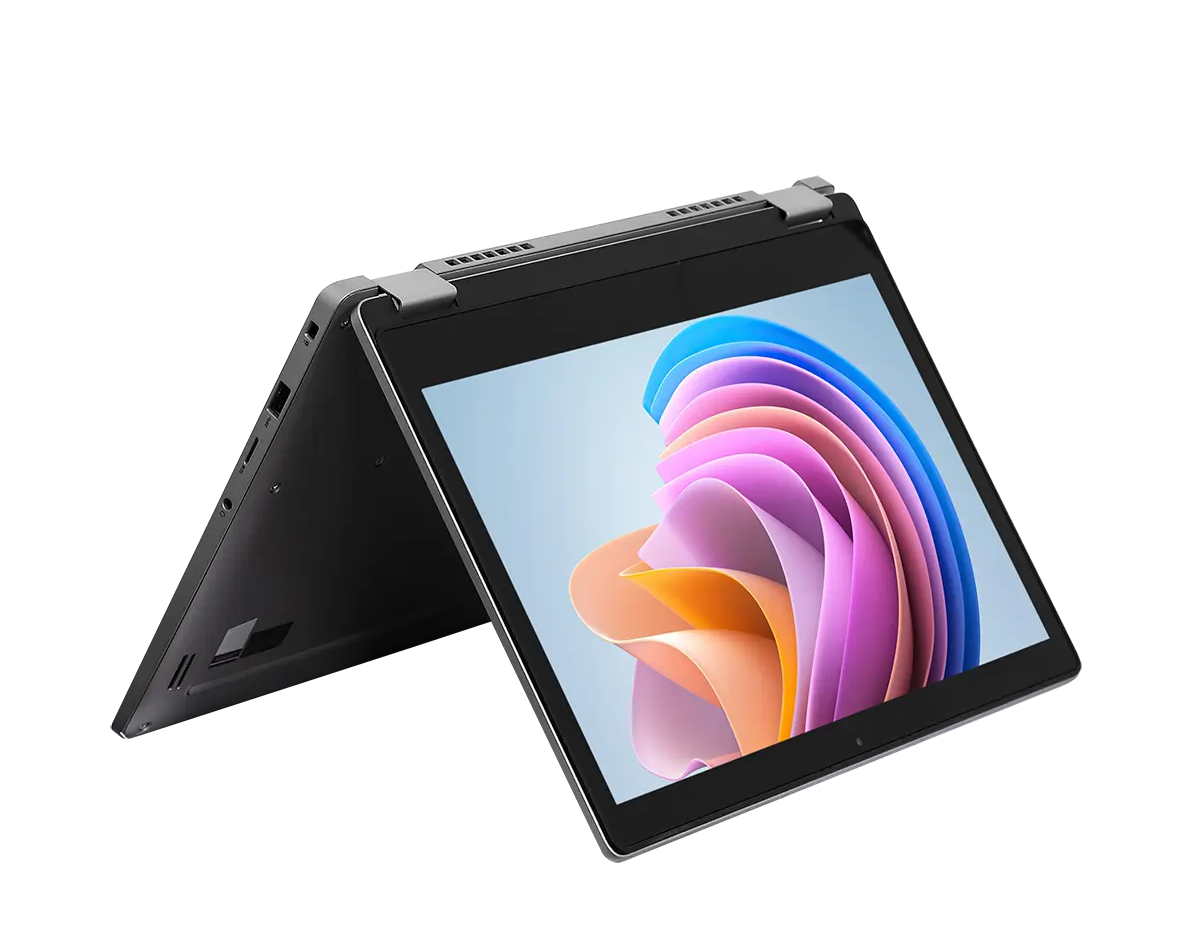
360-Degree hinges, a chassis that folds from laptop to tablet and back, usually lives in the premium lines, where you pay accordingly for it. The Dell Latitude 3310 2-in-1 brings it down to the entry tier of the Latitude portfolio. This is a convertible 13.3-inch machine with a touchscreen, made for people who want a tablet mode for presentations, note-taking or teaching, without the price of an ultra-premium convertible like the Dell Latitude 9420 2-in-1. The hinges travels the full 360 degrees, so the screen sits where you need it: upright for writing, tilted for viewing, or folded all the way into a tablet.
In practice that means one machine for two different situations. On a desk, the Dell Latitude 3310 2-in-1 works as a normal 13.3-inch laptop with a physical keyboard. In a meeting or a classroom, the screen flips, the body folds behind it, and the device becomes a tablet you can show from across the table or hold in hand while writing notes straight on the touchscreen. That flexibility comes with a starting weight of around 1.55 kg, roughly the same as the standard Dell Latitude 3310, for which Dell lists around 1.6 kg depending on the variant. So the choice is not simply about more or less in the bag. If you do not need the 360-degree hinges, the standard Dell Latitude 3310 offers the same platform for office work and a built-in Ethernet port.
The Latitude 3000 series exists for a specific reason. When Dell folded its older Vostro range into Latitude, it created a dedicated entry business line aimed at two audiences the big flagships often skip: schools and small businesses. That heritage shows in the Dell Latitude 3310 2-in-1. The series has long leaned on touchscreens and durability, because a device that passes from hand to hand in a classroom, or travels into the field, has to take knocks, while a touch panel invites direct interaction. The chassis here is reinforced polymer composite rather than an aluminium unibody, but it is tested to MIL-STD-810G for shock, vibration and temperature, and the areas around the hinges are reinforced with aluminium to survive the thousands of rotations a convertible goes through. The result is a device that holds steady in tablet mode and does not flex when you grab it by one corner.
How seriously Dell takes that mission shows in the protocol its education machines endure: drops from seventy-six centimeters onto a steel plate, thousands of “micro-drops” from about ten centimeters, hinges opened and closed until the counter reaches tens of thousands of cycles, a fully sealed keyboard against whatever spills on the desk. A specification dictated not by marketing but by classroom statistics. That is why such machines feel at home anywhere hardware passes through many, not particularly careful, hands.
Under the hood, the platform is 8th-generation Intel Core (Whiskey Lake-U) with integrated UHD Graphics 620, a configuration aimed at everyday office and study work: documents, a browser with a dozen tabs, email, video calls and web apps. Memory is DDR4-2400 up to 16 GB, and storage is an M.2 NVMe SSD that can be swapped for a larger drive when needed. The 42 Wh battery supports Dell ExpressCharge, roughly 80% in an hour with the bundled charger, provided it is a compatible 65 W power supply, with the computer off and ExpressCharge enabled. The camera is 720p with a physical privacy shutter, and for password-free sign-in there is an optional fingerprint reader built into the power button: one press turns the machine on and recognises you in a single motion. For connectivity the model relies on 2× USB-A, USB-C with DisplayPort, HDMI and a microSD reader, a practical set that still matters in a classroom or an older office. Wired networking needs a compatible USB-C adapter or a docking station.
An honest word on the limits. This is entry class: no Thunderbolt, no discrete graphics, and memory in a single SO-DIMM slot that tops out at 16 GB according to Dell, so upgrading means swapping the module. If you want a convertible with a higher level of build and keyboard, the Lenovo ThinkPad L390 Yoga is a step up in the mainstream class with the familiar ThinkPad keyboard. If the goal is a no-compromise premium 2-in-1, with an aluminium body, brighter displays and a 5G option, that is the territory of the Dell Latitude 9420 2-in-1, and a different price class altogether. For a buyer who wants an affordable convertible for presentations, notes and study work, the Dell Latitude 3310 2-in-1 lands exactly in that niche. As a refurbished business laptop from ITR Bulgaria it arrives after a technical audit, with genuine software and a real warranty, a way to get 2-in-1 flexibility from an established business brand at the price of a used laptop, not a new ultra-premium convertible.
Who it's for
Scenarios where the Dell Latitude 3310 2-in-1 makes the most sense
Presentations and meetings in tablet mode
Flip the screen, fold the body behind it, and show a quote or schedule straight from across the table, without spinning the whole laptop toward the client. Back at the desk it returns to a normal laptop with a keyboard for typing.
Education with an interactive screen
For a learning environment the touchscreen and the durable build go together. A student or instructor taps directly on the screen, while the MIL-STD-810G tested chassis takes the daily carry between rooms and desks.
Mobile staff who value flexibility
One machine covers the desk and the move: a full laptop when you sit down to work with documents, and a tablet in hand when you need to show something quickly or tick off a checklist on your feet.
Handwritten notes in tablet mode
In tablet mode the touchscreen takes handwritten notes and document signatures straight on the glass, practical for people who prefer to write by hand rather than type on a keyboard during a conversation.
Model highlights
Entry Latitude 3000 series
Latitude 3000 is Dell's entry business line, below 5000 (mainstream) and 7000 (flagship). It competes with the HP ProBook 400 and Lenovo ThinkPad E series, built for education and small business.
360° convertible build
The hinges turn the screen through the full 360 degrees, from laptop to tablet, with intermediate positions for viewing and presenting. The 13.3-inch touchscreen works in all four positions.
Intel Whiskey Lake-U
8th-generation Intel Core (Whiskey Lake-U), Core i3 or i5, with integrated UHD Graphics 620. Enough for documents, browser, email and video calls in everyday use.
13.3″ 16:9 touch display
A 16:9 FHD IPS touch panel with input on the glass, with brightness up to around 250 nits. Suited to close-up work and finger input.
42 Wh battery with ExpressCharge
A 3-cell 42 Wh battery with Dell ExpressCharge, about 80% in an hour and a full charge in about two hours with the computer off, ExpressCharge enabled and a compatible 65 W power supply. Enough for a school day or a run of meetings between charges.
DDR4 memory + NVMe SSD
DDR4-2400 memory up to 16 GB and fast M.2 NVMe SSD storage (up to 1 TB), which can be swapped for a larger drive when needed. RAM sits on a single replaceable SO-DIMM module, up to 16 GB according to Dell.
Polymer composite, MIL-STD-810G
The chassis is polymer composite, tested to MIL-STD-810G for shock, vibration and temperature, with aluminium reinforcement around the hinges. Around 20 mm thick, in a titan gray finish.
Connectivity and ports
2× USB-A, USB-C with DisplayPort 1.2, HDMI 1.4a, a microSD reader and an audio jack; Wi-Fi 5 and Bluetooth 5.0. Connect an HDMI monitor and USB-A peripherals directly; wired networking needs a compatible USB-C adapter or a docking station.
Refurbished by ITR Bulgaria: what value do you get?
Buying a refurbished business-class laptop makes the most sense when the device has gone through a standardised in-house refurbishment process and ships with a real warranty. That is how used laptops become refurbished laptops that can be a practical, dependable and professional alternative to new budget machines, or a far more sensible purchase than new premium equivalents.
- ✓ Technical audit and cosmetic assessment of the device against an internal standard
- ✓ Refurbishment, cleaning, quality improvement and configuration to a standard for repeat business use
- ✓ Genuine software and a configuration prepared for the specific model
- ✓ Packaging, a real warranty and model support from ITR Bulgaria
Ready to browse the available units?
The Dell Latitude 3310 2-in-1 is a refurbished business laptop with a 360° hinges and touchscreen, an affordable way to get 2-in-1 flexibility from an established brand. Browse current stock or get in touch for assistance.
Additional information
Where the Dell Latitude 3310 2-in-1 fits in the series ▼
The Dell Latitude 3310 2-in-1 belongs to Latitude 3000, Dell's entry business series. In the portfolio hierarchy, 3000 sits below 5000 (mainstream) and well below 7000 (flagship) and 9000 (ultra-premium). That positioning defines its character: essential functionality, a durable build and an affordable price, without the premium materials and features of the higher series.
Within the Dell Latitude 3310 itself there are two builds. The standard Dell Latitude 3310 is a clamshell laptop with no 360-degree hinges. The 2-in-1 version you are looking at here adds a touchscreen and convertible hinges, a separate build for people who want a tablet mode. The two share the entry platform but differ in form factor and weight.
Compared with the convertibles higher up the line, the Dell Latitude 3310 2-in-1 is the affordable starting point: the Dell Latitude 9420 2-in-1 is a premium 2-in-1 from an entirely different class and price, whereas here you get the same 360-degree idea in an entry build.
The Dell Latitude 3310 2-in-1 is not ideal if… ▼
- You don't need a tablet mode or touchscreen. In that case the standard Dell Latitude 3310 (clamshell laptop) does the same office work, with a similar starting weight depending on configuration.
- You want a ultra-premium convertible with an aluminium body, brighter displays and a 5G option. For that class look at the Dell Latitude 9420 2-in-1, which is in an entirely different price category.
- You need discrete graphics, Thunderbolt or large upgradeable memory. This is an entry platform with integrated graphics, no Thunderbolt, and a single SO-DIMM slot for RAM up to 16 GB.
- You care about minimum weight for daily carry. Starting around 1.55 kg, the 2-in-1 version is close in weight to the standard clamshell Dell Latitude 3310, depending on configuration.
- You need a guaranteed specific configuration (a particular processor, RAM, SSD or display). Configurations vary, so it is important to check the specific unit before purchase.
Clamshell or 2-in-1: which to choose? ▼
The 13.3-inch class is compact and easy to carry, enough screen for documents and video calls in a small body. This is common to both versions of the Dell Latitude 3310.
2-in-1 (this model): 360-degree hinges and a touchscreen. Choose it if you will actually use tablet mode, for face-to-face presentations, handwritten notes or interactive use in teaching. The starting weight is around 1.55 kg, close to that of the standard version and not necessarily higher.
Standard laptop (Dell Latitude 3310): no 360-degree hinges, touchscreen optional, similar starting weight. The more sensible choice if you work mostly with the keyboard and tablet mode brings you no real benefit. Same entry platform, similar weight in the bag.
In short: the 360-degree hinges are the sensible choice only if tablet mode is part of your daily routine. If not, the clamshell is the more reasonable buy for the same money.
Alternative models ▼
Within Dell:
Dell Latitude 3310 — the standard clamshell version from the same series and platform, without 360-degree hinges, with an optional touchscreen. Similar in weight and usually more affordable. The sensible choice if you don't need tablet mode.
Dell Latitude 9420 2-in-1 — Dell's ultra-premium convertible flagship, from an entirely different class: an aluminium body, brighter displays, a 5G option and enterprise features. An alternative if you want a no-compromise 2-in-1 and the budget allows a significantly higher price.
Cross-brand alternative (13.3″ convertible):
Lenovo ThinkPad L390 Yoga — a convertible from the mainstream Lenovo ThinkPad L line, a step up from the entry class. It brings the familiar Lenovo ThinkPad keyboard and a higher level of build. A sensible alternative if you value the typing feel and are ready for a class above the 3000 series.
Note: when choosing an alternative, compare the same form factor (convertible) and a similar class. A standard laptop and a 2-in-1 solve different scenarios.
Refurbished by ITR Bulgaria: what value do you get? ▼
With an entry convertible like the Dell Latitude 3310 2-in-1, refurbishment by ITR Bulgaria has clear practical logic. The Latitude 3000 series is built for durable business and study use, its components are standardised, and the SSD can be swapped, which makes the device well suited to professional refurbishment with a traceable result.
After going through the process, the used laptop is prepared for repeat use: a technical audit, cleaning, configuration, genuine software and packaging with a real warranty. So instead of an unchecked second-hand machine you get a refurbished business laptop with model support from ITR Bulgaria, and access to 2-in-1 flexibility at a reasonable price.
Frequently asked questions ▼
How does the Dell Latitude 3310 2-in-1 differ from the standard Dell Latitude 3310?
The main difference is the form. The 2-in-1 version has 360-degree hinges and a touchscreen, so it folds from laptop to tablet; the standard Dell Latitude 3310 is a clamshell laptop without 360-degree hinges, with an optional touchscreen. The two share the entry platform, and the 2-in-1 is close in weight (starting around 1.55 kg). Choose the 2-in-1 if you will use tablet mode; otherwise compare the clamshell by its specific configuration.
What processor generation does the model use?
The Dell Latitude 3310 2-in-1 runs on the 8th-generation Intel Core platform (Whiskey Lake-U), Core i3 or i5, with integrated UHD Graphics 620. That is a configuration for everyday office and study work: documents, browser, email and video calls.
Is it a good choice as a used laptop?
For a specific purpose, yes. As a refurbished laptop, the Dell Latitude 3310 2-in-1 gives you 2-in-1 flexibility from an established business brand at a price well below a new convertible in the same class. The durable build and swappable SSD make it suitable for refurbishment. It is not a machine for heavy graphics or video editing; for those tasks, look at a higher class.
What configurations are available?
You'll find Intel Core i3 or i5 (8th generation), RAM up to 16 GB DDR4, an M.2 NVMe SSD in various capacities, an FHD touch display and an optional fingerprint reader in the power button. RAM sits on a single replaceable SO-DIMM module, but it is still important to check the specific unit before purchase.